Games keep getting bigger, and local AI models can take tens of gigabytes each, so a single 8TB drive is starting to make sense for more people. Only a handful of consumer SSDs come in 8TB versions, and they differ a lot in interface, speed and endurance. Forge PC hasn't tested these drives. The picks below are ranked on the manufacturers' published specifications and features, not on our own benchmarks, and all speeds are the makers' "up to" figures.
Our picks at a glance
Drive | Interface | Seq. read / write (rated) | Endurance | Warranty |
|---|
Samsung 9100 PRO 8TB | PCIe 5.0 x4, NVMe 2.0, M.2 2280 | 14,800 / 13,400MB/s | 4,800TBW | 5 years |
WD_BLACK SN850X 8TB | PCIe 4.0 x4, M.2 2280 | Check the 8TB spec (7,300MB/s is for 1TB-4TB) | See spec sheet | 5 years |
Corsair MP600 PRO NH 8TB | PCIe 4.0 x4, NVMe 1.4, M.2 2280 | Up to 7,000 / 6,500MB/s (series) | Not listed on the page we used | 5 years |
Samsung 870 QVO 8TB | SATA 6Gb/s, 2.5-inch | 560 / 530MB/s | 2,880TBW | 3 years |
1. Samsung 9100 PRO 8TB: the fastest 8TB drive
Best for: new PCs with a PCIe 5.0 M.2 slot.
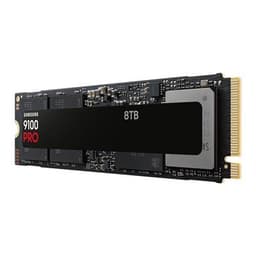
Samsung's 9100 PRO is a PCIe 5.0 x4 NVMe 2.0 drive, and the 8TB version is rated at up to 14,800MB/s sequential reads, 13,400MB/s writes and up to 2,200,000 / 2,600,000 random read/write IOPS. It uses Samsung V-NAND TLC, an in-house controller and 8GB of low-power DDR4X cache. Samsung backs it with a five-year warranty or 4,800TBW, whichever comes first.
The catch is that you need a PCIe 5.0 M.2 slot to get those speeds, and Samsung rates average power at 10.5W reading and 8.8W writing, so good cooling matters. Our PCIe 4.0 vs PCIe 5.0 SSD comparison explains whether the extra speed is worth it, and SSD heatsink vs no heatsink covers cooling. For more Gen5 options, see the best PCIe 5.0 SSDs.
2. WD_BLACK SN850X 8TB: the established Gen4 gaming choice
Best for: PCIe 4.0 gaming PCs and anyone who wants a heatsink option.
The SN850X is now sold by SanDisk under the WD_BLACK brand, in capacities from 1TB to 8TB. SanDisk quotes up to 7,300MB/s for the 1TB to 4TB models, so check the 8TB model's own spec sheet before buying if peak speed matters to you. There's a heatsink option, a five-year limited warranty, and the WD_BLACK Dashboard app (Windows only) for drive health, RGB lighting and the SN850X's Game Mode 2.0. SanDisk says the drive is designed for gaming PCs and PlayStation 5 consoles.
If your motherboard only has PCIe 4.0 M.2 slots, a Gen4 drive like this is the sensible choice, because you need a PCIe 5.0 slot to get Gen5 speeds. Our best PCIe 4.0 SSD guide has more Gen4 options.
3. Corsair MP600 PRO NH 8TB: Gen4 without a heatsink
Best for: motherboards with their own M.2 heatsinks, and laptops with PCIe 4.0 slots.
The "NH" stands for no heatsink. Corsair's page describes a PCIe 4.0 x4 NVMe 1.4 drive in the M.2 2280 form factor, using 3D TLC NAND, with sequential speeds of up to 7,000MB/s read and 6,500MB/s write. Corsair notes that performance and endurance vary by capacity and are reduced on Gen3 slots. It comes with a five-year warranty.
Corsair says the compact 2280 form factor makes it a good upgrade for laptops with PCIe Gen4-capable CPUs, but check that your laptop takes a full-length 2280 drive first. Corsair also sells the 8TB MP600 PRO XT, which has a built-in aluminium heatspreader, though it was listed as out of stock on Corsair's US site when we checked on 19 November 2026. For fitting, see how to install an M.2 SSD.
4. Samsung 870 QVO 8TB: the big SATA drive
Best for: older PCs without spare M.2 slots, and bulk storage for game libraries and media.
Samsung says the 8TB 870 QVO was the largest client SATA SSD when it launched. It's a 2.5-inch SATA 6Gb/s drive rated at up to 560MB/s reads and 530MB/s writes (with Intelligent TurboWrite active), using Samsung's 4-bit MLC (QLC) V-NAND, an MKX controller and 8GB of LPDDR4 cache. Samsung's warranty is three years or 2,880TBW.
SATA is far slower than NVMe, and QLC flash has lower endurance than TLC. But for a large secondary drive that mostly stores games and files, it's a simple upgrade for any PC with a spare SATA port. Our TLC vs QLC SSD and NVMe vs SATA SSD guides explain the trade-offs, and the best SATA SSDs lists alternatives.
How to choose an 8TB SSD
Check your slots. A PCIe 5.0 drive needs a PCIe 5.0 M.2 slot to reach full speed. The 870 QVO needs a SATA port, a SATA data cable and power from the PSU.
Think about endurance. Compare the TBW ratings, which vary a lot between drives: Samsung rates the 9100 PRO 8TB at 4,800TBW and the 870 QVO 8TB at 2,880TBW.
Plan for AI models. If you're storing local LLMs and image models, see how much storage you need for local AI.
Moving from a smaller drive? Our guide to cloning an SSD with free tools shows how to move Windows across.
Is 4TB enough? See the best 4TB SSDs. For cheaper bulk storage, a hard drive still costs less per terabyte.
Our verdict
For a new PC with a PCIe 5.0 slot, the Samsung 9100 PRO 8TB is the fastest choice on paper, with up to 14,800MB/s reads and a 4,800TBW warranty. For PCIe 4.0 systems, the WD_BLACK SN850X 8TB (with an optional heatsink) and the Corsair MP600 PRO NH 8TB (for boards with their own M.2 heatsinks) are the main options. If you just need lots of space in an older PC, the Samsung 870 QVO 8TB is a straightforward SATA upgrade, as long as you accept SATA speeds and QLC endurance.
The bottom line
For a new PC with a PCIe 5.0 slot, the Samsung 9100 PRO 8TB is the fastest choice on paper, with up to 14,800MB/s reads and a 4,800TBW warranty. For PCIe 4.0 systems, the WD_BLACK SN850X 8TB (with an optional heatsink) and the Corsair MP600 PRO NH 8TB (for boards with their own M.2 heatsinks) are the main options. If you just need lots of space in an older PC, the Samsung 870 QVO 8TB is a straightforward SATA upgrade, as long as you accept SATA speeds and QLC endurance.