Skip to content

Best PicksGPU

Best Graphics Cards for Gaming and Local AI in 2026

The graphics cards we'd pick if you want one card for both gaming and running AI models at home, all with 16GB or more: the RTX 5060 Ti 16GB and RX 9060 XT 16GB for tighter budgets, the RTX 5070 Ti and RX 9070 XT in the mid-range, and the 32GB RTX 5090 at the top.

By , Buying Guides & Peripherals Editor

4 min read

Best Graphics Cards for Gaming and Local AI in 2026

Our picks at a glance

  1. 1
    MSI RTX 5060 Ti 16GB Ventus 2X OC Plus
    MSI RTX 5060 Ti 16GB Ventus 2X OC Plus
  2. 2
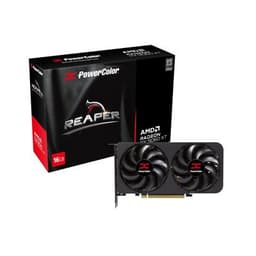
    PowerColor RX 9060 XT 16GB Reaper
    PowerColor RX 9060 XT 16GB Reaper
  3. 3
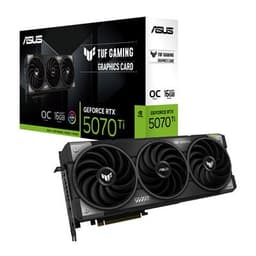
    ASUS RTX 5070 Ti 16GB TUF Gaming OC
    ASUS RTX 5070 Ti 16GB TUF Gaming OC
  4. 4
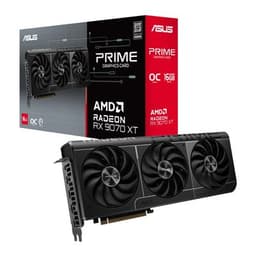
    ASUS RX 9070 XT 16GB Prime OC
    ASUS RX 9070 XT 16GB Prime OC
  5. 5
    NVIDIA GeForce RTX 5090 Founders Edition

Our picks are based on NVIDIA's and AMD's official specification pages and Ollama's hardware support documentation, read on 26 November 2026. We haven't included frame rates or AI speed figures because we haven't measured them ourselves.

Most of our local AI buying guides, such as our best 16GB graphics cards for local AI, assume AI is the main job. Many people, though, want one card that plays games well and can also run a chatbot or image generator in the evenings. For that, you need to balance gaming features with the two things local AI cares about most: video memory (VRAM) and memory bandwidth.

What to look for

  • At least 16GB of VRAM. Games at high settings and local AI models both use a lot of video memory. For AI, the amount of VRAM decides which models fit, as our guide to context length and VRAM explains. Every pick below has 16GB or more.

  • Memory bandwidth. This has a big influence on how fast language models generate text. Our memory bandwidth explainer covers why.

  • Software support. NVIDIA's CUDA is the default target for most local AI tools. Ollama supports the RX 9000 series through ROCm on Linux, but on Windows it relies on its Vulkan backend for these cards, because its Windows ROCm list currently covers RX 7000-series and Radeon PRO W7000 cards.

  • Power. Check the recommended power supply before you buy. Our guide to choosing a PSU for a local AI PC can help.

Best entry-level pick: GeForce RTX 5060 Ti 16GB

The RTX 5060 Ti 16GB is the 16GB option in NVIDIA's RTX 5060 family, giving you 16GB of GDDR7 with full CUDA support. NVIDIA lists 759 AI TOPS, a 128-bit memory bus, 180W total graphics power and a 600W system power requirement for the 16GB model. For games, NVIDIA lists DLSS 4 with Multi Frame Generation. Make sure you buy the 16GB version rather than the 8GB one; our RTX 5060 Ti 8GB vs 16GB comparison explains the difference. In our database: MSI RTX 5060 Ti 16GB Ventus 2X OC Plus.

Best entry-level AMD pick: Radeon RX 9060 XT 16GB

The RX 9060 XT 16GB is the lowest-power card here. AMD rates it at 160W typical board power with a 450W minimum PSU recommendation, and lists 16GB of GDDR6 with up to 320GB/s of bandwidth. AMD lists FSR "Redstone" among its gaming features. It suits gamers who are happy to run AI tools on Linux, or through Vulkan on Windows. See our RX 9060 XT 16GB vs RTX 5060 Ti 16GB for local AI comparison. In our database: PowerColor RX 9060 XT 16GB Reaper.
Best mid-range pick: GeForce RTX 5070 Ti

The RTX 5070 Ti keeps 16GB of GDDR7 but on a 256-bit bus, twice the width of the RTX 5060 Ti's. NVIDIA lists 1,406 AI TOPS, 300W total graphics power and a 750W system power requirement. It's the card we'd pick if you want a clear step up for both gaming and AI without the size and power of the flagship. Our RTX 5060 Ti 16GB vs RTX 5070 Ti for local AI comparison covers the trade-off. In our database: ASUS RTX 5070 Ti 16GB TUF Gaming OC.

Best mid-range AMD pick: Radeon RX 9070 XT

The RX 9070 XT has 16GB of GDDR6 on a 256-bit bus, with AMD quoting up to 640GB/s of bandwidth, double the RX 9060 XT's figure. AMD rates it at 304W typical board power with a 750W minimum PSU recommendation. As with the RX 9060 XT, local AI is easiest on Linux. Our RX 9070 XT vs RTX 5070 Ti for local AI comparison goes into more detail. In our database: ASUS RX 9070 XT 16GB Prime OC.

Best high-end pick: GeForce RTX 5090

The RTX 5090 is the only consumer card here with 32GB, which lets it hold much larger models than the 16GB cards. NVIDIA lists 32GB of GDDR7 on a 512-bit bus and 3,352 AI TOPS. It's also the most demanding: 575W total graphics power and a 1,000W system power requirement. If you're considering it mainly for AI, see our best 32GB graphics cards for local AI. In our database: NVIDIA GeForce RTX 5090 Founders Edition.

Specifications at a glance

Card

VRAM

Memory bus

Power (official)

Recommended PSU

RTX 5060 Ti 16GB

16GB GDDR7

128-bit

180W

600W

RX 9060 XT 16GB

16GB GDDR6

128-bit

160W

450W

RTX 5070 Ti

16GB GDDR7

256-bit

300W

750W

RX 9070 XT

16GB GDDR6

256-bit

304W

750W

RTX 5090

32GB GDDR7

512-bit

575W

1,000W

NVIDIA's AI TOPS figures and AMD's figures are measured in different ways, so we haven't put them side by side. Prices change often, so check them before you buy.

Our verdict

For one card that handles both gaming and local AI, we'd start with the RTX 5070 Ti: 16GB of GDDR7 on a 256-bit bus and full CUDA support. On a tighter budget, the RTX 5060 Ti 16GB or RX 9060 XT 16GB give you 16GB for less power. Choose the RX 9070 XT if you prefer AMD and can run your AI tools on Linux, and the RTX 5090 only if you need 32GB for larger models.

The bottom line

For one card that handles both gaming and local AI, we'd start with the RTX 5070 Ti: 16GB of GDDR7 on a 256-bit bus and full CUDA support. On a tighter budget, the RTX 5060 Ti 16GB or RX 9060 XT 16GB give you 16GB for less power. Choose the RX 9070 XT if you prefer AMD and can run your AI tools on Linux, and the RTX 5090 only if you need 32GB for larger models.

Sources

  1. 01NVIDIA, GeForce RTX 5060 family product page
  2. 02NVIDIA, GeForce RTX 5070 family product page
  3. 03NVIDIA, GeForce RTX 5090 product page
  4. 04AMD, Radeon RX 9060 XT product page
  5. 05AMD, Radeon RX 9070 XT product page
  6. 06Ollama documentation, Hardware support

About the author

Hannah Vance

Buying Guides & Peripherals Editor

Hannah edits Forge PC's buying guides and component roundups across gaming monitors, mechanical keyboards, mice, cases and power supplies. She specialises in OLED and Mini-LED panel characteristics, low-latency wireless peripherals, acoustic damping and value-for-money component selection for UK PC builders.

More from Hannah Vance

Read next

NVIDIA GeForce 621.40 WHQL Driver Makes the SSD Writes Fix Official

News

NVIDIA GeForce 621.40 WHQL Driver Makes the SSD Writes Fix Official

NVIDIA's GeForce Game Ready 621.40 WHQL driver, released on 24 November 2026, officially fixes the bug that caused excessive background writes to the nvlog.nvlgstg log file. It also adds Game Ready support for Dawn of War IV and Assetto Corsa Rally, and DLSS 5 neural rendering for Where Winds Meet.

Eleanor Shaw2 min

Ryzen AI Max 385 vs Ryzen AI Max+ 395 for Local AI

Versus

Ryzen AI Max 385 vs Ryzen AI Max+ 395 for Local AI

The Ryzen AI Max 385 and Ryzen AI Max+ 395 share the same 256-bit LPDDR5X memory interface and support up to 128GB, but the 395 has more graphics cores and twice the CPU cores. We compare AMD's official specs to show which suits local AI.

Callum Reid3 min

Best Ryzen AI 300 Laptop Processor for Local AI in 2026

Best Picks

Best Ryzen AI 300 Laptop Processor for Local AI in 2026

Which AMD Ryzen AI 300 laptop processor should you choose for local AI? We compare the Ryzen AI 5 340, AI 7 350, AI 9 365, AI 9 HX 370 and HX 375 using AMD's official specs, covering CPU cores, integrated graphics and NPU ratings, and pick the best for most people.

Hannah Vance4 min

Best Linux Distro for Gaming in 2026

Best Picks

Best Linux Distro for Gaming in 2026

The best Linux distros for PC gaming in 2026. Bazzite is our top pick, with Steam, NVIDIA drivers and easy rollbacks built in. CachyOS suits performance tinkerers, Nobara suits gamers who stream, and Linux Mint and Pop!_OS are friendly all-rounders. All are free, and every feature here comes from the projects' own sites.

Hannah Vance5 min