Our picks are based on Unsloth's published VRAM requirements and on NVIDIA's and AMD's official specification pages, read on 26 November 2026. We haven't included speed claims because we haven't measured training times ourselves.
Running a local language model and fine-tuning one are very different jobs. If you only want to chat with models, our best GPU for local LLMs guide is the better starting point. Fine-tuning, which teaches an existing model new behaviour or knowledge using your own data, needs a lot more graphics memory (VRAM), so the right card can be a step up from what you'd buy for inference alone. If you're not sure you need fine-tuning at all, read RAG vs fine-tuning for local LLMs first.
How much VRAM does fine-tuning need?
Unsloth, the training tool we use in our guide to fine-tuning an LLM locally, publishes a table of minimum VRAM requirements. It lists two methods: QLoRA, which loads the model in 4-bit, and LoRA, which uses 16-bit. Unsloth says these are absolute minimums and some models need more.
Model size | QLoRA (4-bit) minimum | LoRA (16-bit) minimum |
|---|
3B | 3.5GB | 8GB |
8B | 6GB | 22GB |
14B | 8.5GB | 33GB |
27B | 22GB | 64GB |
32B | 26GB | 76GB |
70B | 41GB | 164GB |
Source: Unsloth Requirements documentation. Selected rows only.
Two things stand out. First, QLoRA brings fine-tuning within reach of ordinary graphics cards: an 8B model needs about 6GB, and a 14B model about 8.5GB. Second, 16-bit LoRA needs several times as much memory, so it is mainly for small models unless you have a workstation card. Unsloth also notes that a batch size that's too high is a common cause of running out of memory, and suggests 1, 2 or 3 to use less VRAM.
Our picks
Best overall: NVIDIA GeForce RTX 5090 (32GB)
NVIDIA's official specs give the RTX 5090 Founders Edition 32GB of GDDR7. Against Unsloth's table, that's comfortably above the QLoRA minimum for 27B (22GB) and 32B (26GB) models, and enough for 16-bit LoRA on models up to 11B (29GB). NVIDIA rates it at 575W total graphics power and recommends a 1,000W power supply, so plan your PSU and cooling accordingly.
Best for big models: NVIDIA RTX PRO 6000 Blackwell (96GB)
The RTX PRO 6000 Blackwell Workstation Edition has 96GB of GDDR7 with ECC and 1,792GB/s of memory bandwidth, according to NVIDIA. That's above Unsloth's 41GB QLoRA minimum for 70B models and the 64GB LoRA minimum for 27B models. NVIDIA lists maximum power consumption as 600W. It's a professional card with a professional price, so it only makes sense if you regularly train large models.
Best AMD option: AMD Radeon AI PRO R9700 (32GB)
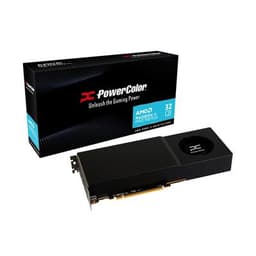
AMD's specs give the Radeon AI PRO R9700 32GB of GDDR6, a 300W total board power and a 750W minimum PSU recommendation. Unsloth's AMD guide says it supports Radeon RDNA 3, 3.5 and 4 cards on Windows and Linux, and AMD lists the R9700's architecture as RDNA 4. It has the same 32GB as the RTX 5090 on paper, at a lower power rating. The PowerColor AI Pro R9700 32GB is in our database. If you plan to use other training software as well, check that it supports AMD GPUs before you buy.
Best value 16GB: NVIDIA GeForce RTX 5070 Ti
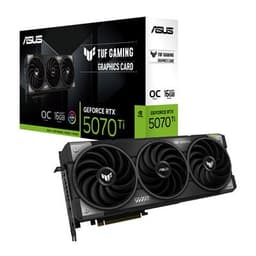
NVIDIA lists the RTX 5070 Ti with 16GB of GDDR7 and a 300W total graphics power. By Unsloth's table, 16GB clears the QLoRA minimum for models up to 14B (8.5GB) with room for longer training examples, and covers 16-bit LoRA for 3B models. The ASUS RTX 5070 Ti 16GB TUF Gaming OC is one example in our database.
Best budget pick: NVIDIA GeForce RTX 5060 Ti 16GB
The RTX 5060 Ti comes in 16GB and 8GB versions, with a 128-bit memory interface and a 180W total graphics power, according to NVIDIA. For fine-tuning, buy the 16GB model: it gives you the same VRAM headroom as the RTX 5070 Ti for QLoRA on models up to 14B, at a lower power rating. See the MSI RTX 5060 Ti 16GB Ventus 2X OC Plus. Our RTX 5060 Ti 8GB vs 16GB comparison explains the difference.
What else to consider
Memory first, speed second. If a training run doesn't fit in VRAM it won't run at all, so capacity matters more than a faster GPU with less memory.
System RAM and storage. Datasets, checkpoints and model downloads take up space, so a fast SSD with plenty of free capacity helps.
Power. Check the PSU recommendation on the card maker's page, and remember that training can keep the GPU busy for hours.
Prices for these cards change quickly, so check current UK listings at specialist retailers such as Scan, Overclockers and Box before you buy.
Our verdict
For most people fine-tuning at home, QLoRA on a 16GB card such as the RTX 5060 Ti 16GB or RTX 5070 Ti covers models up to about 14B, according to Unsloth's requirements. Choose a 32GB card, the RTX 5090 or Radeon AI PRO R9700, for 27B to 32B models with QLoRA or 16-bit LoRA on small models. Only the 96GB RTX PRO 6000 Blackwell meets Unsloth's QLoRA minimum for 70B models.