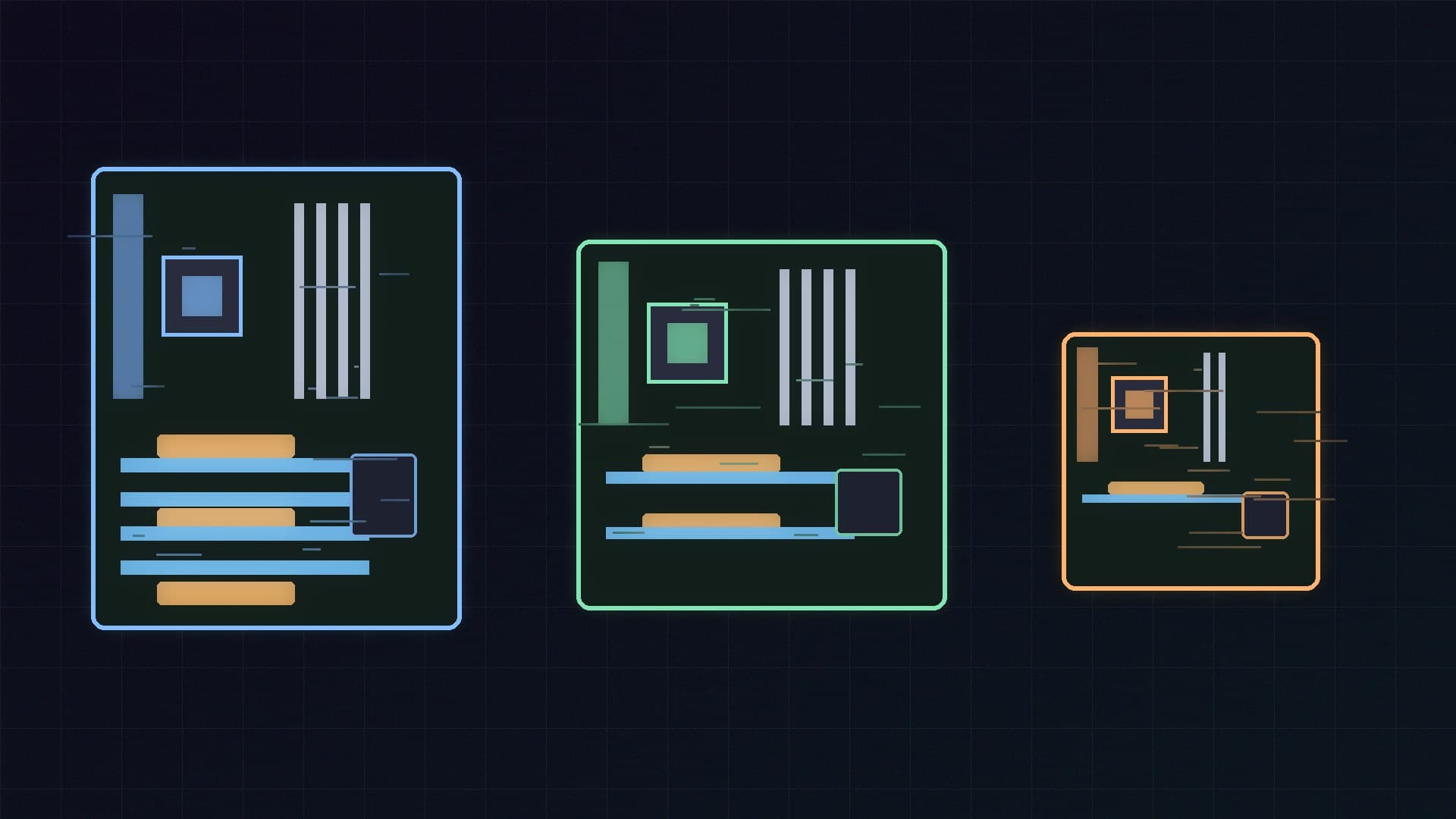
Motherboard size affects more than the case you can use. It sets how many memory slots, M.2 slots and expansion slots you get, and it can limit your choice of power supply and cooler. This comparison uses three current AM5 boards as examples, with figures from ASUS and Gigabyte's official spec pages. Size alone doesn't make a board faster or slower; the chipset and the board's own design matter more.
The short answer
Example board (maker's specs) | Size | Memory slots | M.2 slots | PCIe expansion slots | SATA ports |
|---|
ASUS TUF Gaming B850-PLUS WIFI (ATX) | 30.5 x 24.4 cm | 4 (up to 256GB) | 3 | 4 (two x16-length, two x1) | 4 |
ASUS TUF Gaming A620AM-PLUS WIFI (micro-ATX) | 24.4 x 24.4 cm | 4 (up to 256GB) | 2 | 2 (one x16, one x1) | 4 |
Gigabyte A620I AX (Mini-ITX) | 17 x 17 cm | 2 (up to 128GB) | 1 | 1 (x16) | 2 |
ATX suits most full-size gaming PCs and anyone who wants extra M.2 and expansion slots.
Micro-ATX fits smaller towers and is common on budget boards, often with the same width as ATX but fewer slots.
Mini-ITX is for small-form-factor builds where size matters more than expansion.
These are three examples, not rules. Slot counts vary between boards of the same size, and the chipset limits what a board can offer. A B850 board has PCIe 5.0 storage, while an A620 board doesn't, whatever its size.
ATX: the most room to expand
ASUS lists the TUF Gaming B850-PLUS WIFI at 30.5 x 24.4 cm (12 x 9.6 inches). It has four DDR5 slots, three M.2 slots and four expansion slots. With Ryzen 7000 and 9000 processors, ASUS lists the first M.2 slot at PCIe 5.0 x4 and the main x16 slot at PCIe 5.0. The extra length allows a second x16-length slot and two x1 slots, which is useful for a capture card, sound card or network card.
ASUS notes that the second x16-length slot shares bandwidth with the third M.2 slot, so you can't use both at once. Larger boards often have notes like this, and our guide to checking M.2 slot speed explains how to read them.
Choose ATX if you want three or more NVMe drives, plan to add expansion cards, or are building in a standard mid-tower. Our best AM5 motherboard guide and best B850 motherboard guide cover ATX options.
Micro-ATX: shorter, cheaper, still flexible
ASUS lists the TUF Gaming A620AM-PLUS WIFI at 24.4 x 24.4 cm. It's the same width as ATX but shorter, so there's room for fewer slots. It still has four memory slots and two M.2 slots, but only one x16 slot and one x1 slot.
Not every micro-ATX board is the full 24.4 cm square. ASUS lists the Prime A620AM-K at 22.6 x 22.1 cm, for example. Micro-ATX boards fit in micro-ATX cases and in most ATX cases, but check the case's supported sizes.
Choose micro-ATX if you want a smaller tower or a lower price and only need one graphics card and one or two SSDs. See our best micro-ATX motherboard guide and best micro-ATX case guide.
Mini-ITX: smallest, with the fewest slots
Gigabyte lists the A620I AX at 17 x 17 cm. The board has room for two memory slots, one M.2 slot, two SATA ports and one x16 slot. Gigabyte notes that the x16 slot can take either a graphics card or an NVMe SSD, but not both, since there's only one. The A620I AX makes up for the lack of expansion slots with Wi-Fi 6E and 2.5Gb Ethernet built in, so you won't need an add-in network card.
The trade-offs are mostly in the case. Small cases can require an SFX power supply and limit CPU cooler height, so check the case's spec sheet. Our SFX vs ATX power supply comparison and best Mini-ITX case guide cover this.
Choose Mini-ITX if you want the smallest possible PC and are happy with two memory slots and limited storage expansion. Our best Mini-ITX AM5 motherboard guide covers more options.
What doesn't change with size
CPU support: an AM5 board takes AM5 processors at any size, subject to the maker's CPU support list and BIOS. Our CPU and motherboard compatibility guide explains how to check.
Memory channels: all three example boards run DDR5 in dual-channel mode, so two sticks give you full memory bandwidth on any of them.
Chipset features: PCIe 5.0, CPU overclocking and USB4 depend on the chipset and board, not on size. Our A620 vs B840 and B650 vs B850 comparisons cover the AMD chipsets.
Our verdict
ATX gives you the most slots for SSDs and expansion cards, and suits most mid-tower builds. Micro-ATX keeps the same width with fewer slots, and is often enough for a gaming PC with one graphics card and one or two SSDs. Mini-ITX is the choice for small PCs, but expect two memory slots, one M.2 slot and only the graphics card slot. Choose the size that fits your case and the number of drives and cards you'll actually use, then choose the chipset for the features you need, and check the exact board's spec sheet before you buy. Our how to choose a PC case guide covers the other half of the decision.