Samsung's internal SSD range now covers six current drives that matter to UK PC builders: the PCIe 5.0 9100 PRO, the PCIe 4.0 990 PRO, 990 EVO Plus and plain 990, and the 870 EVO and 870 QVO SATA drives. The names are similar, but the drives differ in interface, whether they carry their own DRAM cache, endurance and warranty, and those differences matter more than the headline speeds. This guide uses Samsung UK's official specifications for the 2TB model of each NVMe drive and the 870 EVO, plus the 1TB 870 QVO page, to recommend the right one for each kind of build. Speeds can vary by capacity, so check the exact model before you buy.
Our picks at a glance
Pick | Drive (2TB model unless stated) | Interface | Seq. read / write | DRAM cache | Warranty |
|---|
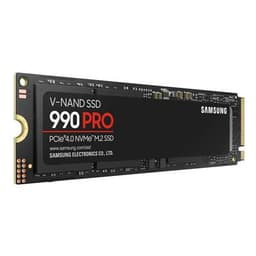
Best overall | 990 PRO | PCIe 4.0 x4, NVMe 2.0 | 7,450 / 6,900 MB/s | 2GB LPDDR4 | 5 years or 1,200TBW |
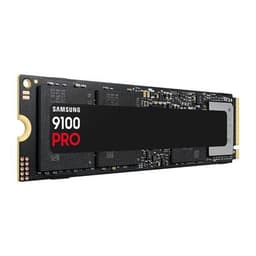
Fastest | 9100 PRO | PCIe 5.0 x4, NVMe 2.0 | 14,700 / 13,400 MB/s | 2GB LPDDR4X | 5 years or 1,200TBW |
Best mainstream NVMe | 990 EVO Plus | PCIe 4.0 x4 / 5.0 x2, NVMe 2.0 | 7,250 / 6,300 MB/s | None (HMB) | 5 years or 1,200TBW |
Best for laptops and low power | 990 | PCIe 4.0 x4, NVMe 2.0 | 7,250 / 6,450 MB/s | None (HMB) | 3 years or 800TBW |
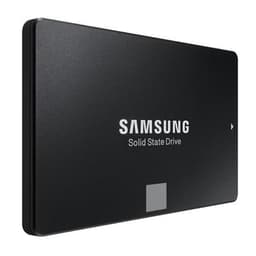
Best SATA SSD | 870 EVO | SATA 6Gb/s, 2.5-inch | 560 / 530 MB/s | 2GB LPDDR4 | 5 years or 1,200TBW |
Best for bulk storage | 870 QVO (1TB specs) | SATA 6Gb/s, 2.5-inch | 560 / 530 MB/s | 1GB LPDDR4 | 3 years or 360TBW (720TBW at 2TB) |
Samsung's warranty runs for the stated years or until you hit the TBW (terabytes written) figure, whichever comes first. Our guide on how to check SSD endurance explains what those numbers mean in practice. For most home users, the gap between 800TBW and 1,200TBW won't matter as much as the extra two years of cover.
Best overall: Samsung 990 PRO
The 990 PRO is still the Samsung drive we'd recommend for most gaming and general-purpose desktops. It's designed for PCIe 4.0 x4 M.2 slots, and Samsung rates the 2TB model at up to 7,450MB/s reads and 6,900MB/s writes. Random performance is rated at up to 1.4 million read and 1.55 million write IOPS at queue depth 32.
Unlike the 990 EVO Plus and 990, the 990 PRO has its own DRAM cache: 2GB of LPDDR4 on the 2TB model. That's the main reason to pay more for it if you work with large projects or keep a drive busy for long stretches; our DRAM vs DRAM-less SSD explainer covers why. It also has the 5-year, 1,200TBW warranty at 2TB. Samsung lists its average power at 5.5W, with a maximum of 8.5W in burst mode.
Samsung lists game consoles as well as PCs as applications for the 990 PRO, and also sells a 990 PRO with Heatsink. If you're shopping for a PlayStation 5, see our best SSD for PS5 guide, and check Sony's own M.2 requirements before buying.
Fastest: Samsung 9100 PRO
The 9100 PRO is Samsung's PCIe 5.0 flagship. Samsung rates the 2TB model at up to 14,700MB/s reads and 13,400MB/s writes, roughly double the 990 PRO's sequential figures, with up to 1.85 million random read and 2.6 million random write IOPS. It keeps a DRAM cache (2GB LPDDR4X at 2TB) and the same 5-year, 1,200TBW warranty as the 990 PRO at that capacity, and Samsung offers it in capacities up to 8TB, with or without a heatsink.
There are two catches. You need a PCIe 5.0 M.2 slot to get those speeds, and it draws more power: Samsung lists an average of 8.1W reading and 7.9W writing, against 4.3W and 3.8W for the 990. Make sure your board's M.2 slot or the drive itself has proper cooling. Samsung says its 5nm controller improves power efficiency by up to 49% over the 990 PRO, but its rated power draw is still well above the 990's. Our PCIe 4.0 vs PCIe 5.0 SSD guide explains when the extra speed is worth it, and Samsung 9100 Pro vs 990 Pro compares the two head to head.
Best mainstream NVMe: Samsung 990 EVO Plus
The 990 EVO Plus is the sensible default if you want a fast Samsung drive without paying for DRAM. Samsung rates the 2TB model at up to 7,250MB/s reads and 6,300MB/s writes, not far off the 990 PRO on paper, and it keeps the 5-year, 1,200TBW warranty at 2TB. Samsung lists its cache as HMB (Host Memory Buffer), so it uses some of your PC's system memory instead of carrying DRAM on the drive.
Its interface is unusual: PCIe 4.0 x4 or PCIe 5.0 x2. In other words, it's built to run over either four PCIe 4.0 lanes or two PCIe 5.0 lanes. Samsung says its nickel-coated controller improves MB/s per watt by 73% over the older 990 EVO, and lists average power at 4.6W reading and 4.2W writing. It comes in capacities up to 4TB, and Samsung says the 4TB model has an enlarged Intelligent TurboWrite 2.0 region. Our 990 Pro vs 990 EVO Plus comparison goes deeper on which of the two to pick.
Best for laptops and low power: Samsung 990
The plain Samsung 990 (model MZ-V9V) has the shortest name in the line-up, but on paper its speeds are close to the 990 EVO Plus. Samsung rates the 2TB model at up to 7,250MB/s reads and 6,450MB/s writes, with up to 850K random read and 1.2 million random write IOPS. Its real selling point is efficiency: Samsung lists average power at 4.3W reading and 3.8W writing, 55mW idle and 3mW in device sleep, and claims up to 38% better performance per watt than the 990 PRO in its own tests on the 2TB model.
That makes it a strong fit for laptops, mini PCs and small builds where heat and battery life matter. The trade-off is the warranty: 3 years or 800TBW at 2TB, against 5 years for the 990 EVO Plus. It's PCIe 4.0 x4 only and, like the EVO Plus, uses HMB rather than DRAM. If you're deciding between the two, our best PCIe 4.0 SSD guide covers rivals from other brands too.
Best SATA SSD: Samsung 870 EVO
If you're upgrading an older PC without an M.2 slot, or adding a 2.5-inch drive to a desktop with spare SATA ports, the 870 EVO is the Samsung drive to get. It's capped by the SATA 6Gb/s interface at up to 560MB/s reads and 530MB/s writes, but it has Samsung's MKX controller, a DRAM cache (2GB LPDDR4 at 2TB) and a 5-year warranty. Samsung's TBW ratings run from 150TBW at 250GB to 4,800TBW at 8TB, with 1,200TBW for the 2TB model. See NVMe vs SATA SSD if you're unsure which your PC can take.
Best for bulk storage: Samsung 870 QVO
The 870 QVO uses 4-bit (QLC) NAND to offer more capacity per drive, up to 8TB. Samsung rates the 1TB model at the same 560MB/s and 530MB/s as the 870 EVO, but its warranty is shorter at 3 years, with lower endurance: 360TBW at 1TB, 720TBW at 2TB, 1,440TBW at 4TB and 2,880TBW at 8TB. It's best as a large game library or media drive that's mostly read rather than written. Our 870 EVO vs 870 QVO and TLC vs QLC SSD guides explain the trade-off.
Before you buy
Check your slots. Look up your motherboard manual to see which M.2 slots run at PCIe 5.0 x4, PCIe 4.0 x4 or fewer lanes, and whether using one disables a SATA port or another slot.
Mind the heat. The 9100 PRO in particular should sit under a motherboard M.2 heatsink, or you can buy the heatsink version.
Keep the firmware current. Our guide on how to use Samsung Magician covers Samsung's drive management software.
Install it properly. Our how to install an M.2 SSD guide walks through the process.
Full specifications for the 2TB models are in our database: Samsung SSD 990 Pro 2TB, 990 Pro with Heatsink 2TB, Samsung SSD 9100 Pro 2TB, 9100 Pro with Heatsink 2TB, Samsung SSD 990 EVO Plus 2TB, Samsung 990 2TB, Samsung SSD 870 EVO 2TB and Samsung 870 QVO 2TB.
Our verdict
The Samsung 990 PRO is the best Samsung SSD for most PC builders: on Samsung's specs it runs at up to 7,450MB/s in a PCIe 4.0 x4 slot, keeps a DRAM cache and has a 5-year, 1,200TBW warranty at 2TB. Buy the 9100 PRO only if you have a PCIe 5.0 slot and can cool it. The 990 EVO Plus is the alternative with the same warranty but no DRAM cache, while the 990 suits laptops and small PCs thanks to its low power ratings, at the cost of a 3-year warranty. For SATA, choose the 870 EVO, and keep the 870 QVO for bulk storage.