HYTE has built its reputation on showcase cases: dual-chamber designs with wraparound glass, graphics cards mounted vertically against the glass and, on the Y70 Touch Infinite, a touchscreen built into the case itself. Its range is small, which makes choosing easier, but the models differ more than they look, especially on graphics card clearance, radiator support and cooler height. We haven't listed prices because they're moving around Black Friday; check current UK listings at retailers such as Scan, Overclockers and Box.
Quick picks
Pick | Case | Best for |
|---|
Best overall | HYTE Y70 | Big showcase builds with a vertical GPU |
Best with a screen | HYTE Y70 Touch Infinite | Builders who want a touchscreen in the case |
Best for airflow and quiet | HYTE X50 | Conventional builds with a normal GPU mount |
Best mid-size showcase | HYTE Y60 | A smaller dual-chamber case with fans included |
Best value showcase | HYTE Y40 | Panoramic glass on a simpler, ATX-only layout |
Spec | Y70 | Y70 Touch Infinite | X50 | Y60 | Y40 |
|---|
Type | Dual-chamber mid-tower | Dual-chamber mid-tower | ATX mid-tower | Dual-chamber mid-tower | ATX mid-tower |
Volume | 70.7L | 70.7L | 63L | 60L | 50L |
Motherboards | ITX to E-ATX | ITX to E-ATX | ITX to E-ATX (up to 10.6in) | ITX to E-ATX | ITX, mATX, ATX |
Max GPU length | 422mm | 390mm | 430mm | 375mm | 422mm |
Max GPU thickness | 105mm | 105mm | 160mm (height) | 75mm | 94mm |
Max CPU cooler | 180mm | 180mm | 170mm | 160mm | 183mm |
Max PSU length | 235mm | n/a on comparison table | 223mm | 235mm | 224mm |
Top radiator | Up to 360mm, 68mm thick | Up to 360mm, 68mm thick | n/a (front, side, rear mounts) | Up to 360mm, 30-32mm thick | Up to 360mm |
Side radiator | Up to 360mm, 125mm thick | Up to 360mm, 125mm thick | Up to 360mm, 70mm thick | Up to 280mm, 125-150mm thick | Up to 280mm, 120mm thick |
Riser cable | PCIe 4.0 x16 included | PCIe 4.0 x16 included | No vertical mount | PCIe 4.0 x16 included | PCIe 4.0 x16 included |
Front USB-C | USB 3.2 Gen 2 | USB 3.2 Gen 2 | USB 3.2 Gen 2x2 | USB 3.2 Gen 2 | USB 3.2 Type-C |
HYTE's spec pages don't all use the same wording, so where a figure differs between pages we've used the model's own page. For the Y70 Touch Infinite, HYTE's comparison table lists a 390mm maximum graphics card length, shorter than the 422mm listed for the standard Y70, so check your card against that figure.
1. HYTE Y70: best overall
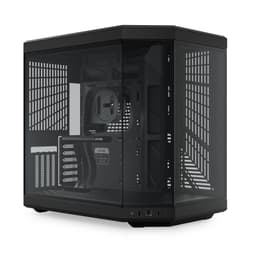
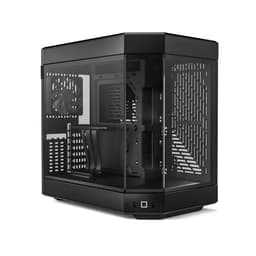
The Y70 is HYTE's flagship dual-chamber case. HYTE describes it as an upgraded mid-tower with "massive 4 slot vertical graphics", and the spec page lists four full-height plus seven half-height expansion slots, a 422mm graphics card limit with 105mm thickness, and a 180mm CPU cooler limit. The radiator support is the strongest in the range for a showcase case: a 360mm radiator up top at up to 68mm thick, and a 360mm radiator on the side at up to 125mm thick. It also has room for 3x 120mm fans in the floor at up to 32mm thick.
It suits large graphics cards and builds with two radiators. The trade-off is size: at 70.7L and 470 x 320 x 470mm it's a wide case, so measure your desk. HYTE lists a four-year warranty.
2. HYTE Y70 Touch Infinite: best with a screen
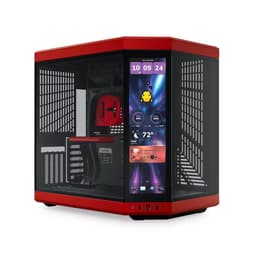
The Y70 Touch Infinite is the Y70 with a 14.9-inch touchscreen built into the case. HYTE lists it as a 682 x 2560 (2.5K) IPS panel at 60Hz with 10-point multi-touch and 178 PPI, controlled through HYTE's Nexus software. You can use it for system monitoring, widgets or artwork without fitting a separate screen.
Cooling support matches the standard Y70 on HYTE's comparison table (360mm top and side radiators, 32mm-thick floor fans, 180mm coolers), but the listed maximum graphics card length is 390mm. Choose it if the screen is the point of your build; otherwise the standard Y70 does the same job with more GPU length.
3. HYTE X50: best for airflow and quiet
The X50 is a different kind of HYTE case. It's a conventional ATX mid-tower without a vertical graphics card mount, with what HYTE calls full-coverage micro-mesh for low-resistance intake, louvred ventilation and 4mm laminated acoustic glass to damp noise. HYTE lists room for 3x 120mm fans in the floor at up to 32mm thick, 3x 120mm on the side, three 120mm or 140mm fans at the front and one at the rear.
It has the longest graphics card limit in the range (430mm, 160mm high) and the fastest front USB-C port (USB 3.2 Gen 2x2). The 170mm cooler limit is the lowest except for the Y60. It's available in six colours, and HYTE also sells an X50 Air variant. Read our mesh vs glass front comparison if you're weighing airflow against looks.
4. HYTE Y60: best mid-size showcase
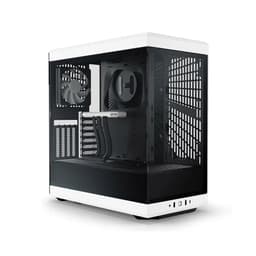
The Y60 is the smaller dual-chamber model. HYTE lists three 120mm fans included (two in the floor and one at the rear, at 1,300rpm), a PCIe 4.0 x16 riser cable, a 375mm graphics card limit at 75mm thick, and a 160mm CPU cooler limit. Top radiators are limited to 30mm thick.
The tighter GPU thickness and cooler height are the main limits. HYTE's own footnote says that if you use an air cooler rather than a liquid cooler, it recommends adding two intake fans on the side mount. If you're planning a very thick graphics card, the Y70 is the safer choice.
5. HYTE Y40: best value showcase
The Y40 brings panoramic glass and a vertical graphics card to a simpler ATX-only design. HYTE lists two 120mm fans pre-installed (one under the floor and one at the rear), a PCIe 4.0 x16 riser, a 422mm graphics card limit at 94mm high (HYTE recommends 80mm or less for best cooling), and the tallest cooler support in the range at 183mm. Radiators go up to 360mm on top and 280mm on the side.
It doesn't support E-ATX boards and has no RGB lighting, according to HYTE. For most single-GPU ATX builds that's no hardship.
How to choose
Check your graphics card's length and thickness first. HYTE's vertical-mount cases limit thickness (75mm on the Y60 to 105mm on the Y70). Our vertical vs horizontal GPU mount guide explains the cooling trade-offs.
Check cooler height. It ranges from 160mm (Y60) to 183mm (Y40).
Plan fans. Only the Y60 and Y40 list fans included on HYTE's pages.
Measure your desk. Dual-chamber cases are wider than conventional towers.
Our how to choose a PC case guide covers the general checks, and if you're comparing brands see our best Lian Li case and best NZXT case guides.
Our verdict
On HYTE's specifications, the Y70 is the best all-round HYTE case, with the most radiator room and support for thick graphics cards in a vertical mount. The Y70 Touch Infinite is worth it only if you want the built-in touchscreen. The X50 is the pick for a quieter, conventional build with a normal GPU mount, the Y60 suits smaller showcase builds with fans included, and the Y40 is the simplest way into the panoramic-glass look. Check your graphics card and cooler dimensions against HYTE's limits before you buy, and read independent reviews for thermals and noise.