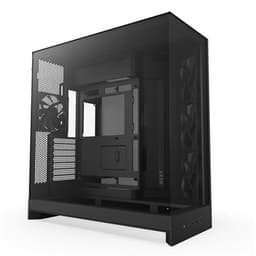
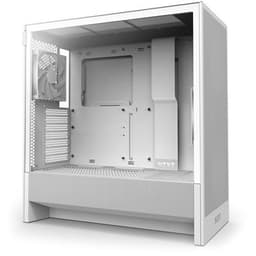
NZXT's H-series range covers everything from Mini-ITX to large dual-chamber cases, which can make it confusing. There are 2026 curved-glass versions of the H5 and H7, the dual-chamber H9 Flow, and Flow airflow models in micro-ATX and Mini-ITX sizes. This guide helps you choose the right one. Our picks are based on NZXT's official specifications, linked in the sources, and we don't make temperature or noise claims because we haven't measured them. For measured results, check independent reviews from established outlets.
Our picks at a glance
Pick | Best for | Motherboards (NZXT) | GPU length (max) | CPU cooler height (max) | Biggest radiator |
|---|
NZXT H5 (2026) | Best overall compact mid-tower | ATX, mATX, Mini-ITX | 420 mm | 172 mm | 360 mm (side or top) |
NZXT H7 (2026) | Big GPUs and 420 mm AIOs | ATX, mATX, Mini-ITX | 495 mm | 188 mm | 420 mm (side, or top with mesh panel) |
NZXT H9 Flow | Dual-chamber showcase builds | E-ATX (up to 277 mm), ATX, mATX, Mini-ITX | 459 mm | 165 mm | 420 mm (front-right or top) |
NZXT H5 Flow | Airflow on a budget | E-ATX (up to 277 mm), ATX, mATX, Mini-ITX | 410 mm | 170 mm | 360 mm (front) |
NZXT H3 Flow | Micro-ATX builds | mATX, Mini-ITX | 377 mm | 170 mm | 280 mm (front) |
NZXT H2 Flow | Mini-ITX builds | Mini-ITX | 331 mm | 75 mm | 280 mm (front) |
All figures are NZXT's, and some clearances fall when you fit fans or radiators (see each pick). NZXT lists a two-year warranty for each of these cases.
Best overall: NZXT H5 (2026)
The NZXT H5 (2026) is the newest version of NZXT's best-known compact mid-tower. It has a single piece of curved tempered glass across the front and left side. NZXT lists:
Size: 468.5 x 233 x 431.1 mm (H x W x D), 47 litres
Motherboards: ATX, Micro-ATX and Mini-ITX, with back-connect support for ATX boards
Clearances: GPUs up to 420 mm, with an adjustable anti-sag bracket; CPU coolers up to 172 mm; PSUs up to 200 mm; up to 33 mm of cable routing space
Cooling: up to 10 fan mounts; radiators up to 360 mm on the right side or top, plus 120 mm at the rear
Front I/O: 2x USB 3.2 Gen 1 Type-A (5Gbps), 1x USB 3.2 Gen 2x2 Type-C (20Gbps) and a headset jack
Why it's our top pick: it fits a full ATX build, including back-connect boards, a long graphics card and a 360 mm AIO, in a 47-litre case. NZXT also sells an H5 RGB+ version with an F360 RGB Reverse fan in the bottom and an F120 RGB fan at the rear, pre-installed and wired.
Things to check: with a top radiator, NZXT lists a RAM height limit of 54.8 mm with 120 mm fans, or 34.8 mm with 140 mm fans. Use low-profile memory if you plan that layout. NZXT says the 2026 H5 is rolling out to retailers over the coming months, so UK stock may vary. Our news story on the 2026 H5, H7 and Kraken Core covers the launch.
Best for big GPUs and 420 mm AIOs: NZXT H7 (2026)
The NZXT H7 (2026) is the larger curved-glass model. NZXT lists:
Size: 551 x 260 x 525 mm, 75.2 litres
Clearances: GPUs up to 495 mm (with a 30 mm front-right fan); CPU coolers up to 188 mm; PSUs up to 200 mm; up to 42 mm of cable routing space
Cooling: 10 fan mounts, including three 140 mm fans on the right side and three 140 mm fans at the bottom; radiators up to 420 mm on the right side, or on top when you swap the glass top for the included steel mesh panel; 140 mm at the rear
Storage: five 2.5-inch and two 3.5-inch bays
Front I/O: 2x USB-A (5Gbps), 1x USB-C (20Gbps) and a headset jack; back-connect ATX support
Why it's here: it has the most GPU length and CPU cooler clearance in this list, takes 420 mm radiators and has the most drive bays.
Things to check: NZXT says the standard H7 is "ready for the fans of your choice", which means it doesn't include fans. Budget for them. The H7 RGB+ comes with two F420 RGB Reverse fans, an F140 RGB fan and a Control Hub Lite. Like the H5, it is rolling out to retailers over the coming months.
Best dual-chamber case: NZXT H9 Flow
The NZXT H9 Flow puts the power supply in a rear chamber, leaving the main chamber for the motherboard, graphics card and fans. NZXT lists:
Size: 506 x 315 x 481 mm, 76.7 litres
Motherboards: E-ATX up to 277 mm wide, ATX, Micro-ATX and Mini-ITX, with back-connect support for ATX boards
Clearances: GPUs up to 459 mm, or 410 mm with a 56 mm-thick 420 mm AIO at the front-right; CPU coolers up to 165 mm; PSUs up to 200 mm
Cooling: radiators up to 420 mm at the front-right and top, up to 360 mm at the bottom and 120 mm at the rear
Included fans (standard H9 Flow): three F140Q and one F120Q, rated at 1,350 ± 150 rpm
Why it's here: it supports more radiator positions than any other case in this list, and it includes four fans, which is good value for a showcase case.
Things to check: its 165 mm cooler limit is the lowest of the mid-towers here, so check the height of tall dual-tower air coolers. The case is 315 mm wide, so measure your desk space too. Our dual-chamber vs standard case comparison explains the pros and cons.
Best budget airflow pick: NZXT H5 Flow
The NZXT H5 Flow is the mesh-fronted version of the earlier H5 design, and NZXT still lists it alongside the curved-glass 2026 H5. NZXT lists:
Size: 465 x 225 x 430 mm, 45 litres
Clearances: GPUs up to 410 mm; CPU coolers up to 170 mm; PSUs up to 200 mm; E-ATX boards up to 277 mm wide
Cooling: a 360 mm radiator at the front, 240 mm on top (280 mm with low-profile memory only); two F120Q fans included, one at the front and one at the rear
Extras: a perforated PSU shroud with mounts for two bottom intake fans (not included)
Why it's here: it has a mesh front, two included fans and room for a 360 mm front radiator in a slightly smaller case than the 2026 H5. Check current UK prices against the 2026 H5 before you choose.
Things to check: it doesn't support back-connect motherboards, and the top radiator size is limited to 240 mm with standard-height RAM. NZXT also sells an H5 Flow RGB version.
Best micro-ATX case: NZXT H3 Flow
The NZXT H3 Flow is a 35-litre case for micro-ATX and Mini-ITX boards. It supports back-connect micro-ATX boards and standard ATX power supplies up to 185 mm long. NZXT lists GPU clearance of up to 377 mm without front fans, 352 mm with front fans and 317 mm with a front radiator and fans. It also lists 170 mm of CPU cooler clearance, a 280 mm front radiator or 240 mm top radiator, and one included F120Q fan. It's a good choice if you want a smaller desk footprint without moving to SFX power supplies. Our best micro-ATX case guide compares it with rivals.
Best Mini-ITX case: NZXT H2 Flow
The NZXT H2 Flow is a 20.7-litre Mini-ITX case that takes SFX or SFX-L power supplies. NZXT lists GPUs up to 331 mm long, 65 mm thick and 150 mm wide, which covers many three-slot cards. Graphics cards mount vertically through an included PCIe 5.0 riser cable. Its CPU cooler limit is just 75 mm, so most builds will need an AIO, which can go at the front at up to 280 mm. Two top-mounted F120Q exhaust fans are included. See our best Mini-ITX case guide for alternatives and our SFX vs ATX power supply comparison if you're new to small builds.
How to choose between them
Most ATX builds: choose the H5 (2026). It's compact, takes a 360 mm AIO and supports back-connect boards.
High-end GPUs or 420 mm AIOs: choose the H7 (2026), but budget for fans, or the H9 Flow if you want a dual-chamber layout with fans included.
Lowest cost and mesh airflow: choose the H5 Flow.
Smaller builds: choose the H3 Flow for micro-ATX or the H2 Flow for Mini-ITX.
Before you buy, check every clearance against your own parts. Our guides to checking graphics card fit and checking AIO radiator fit explain the key checks, and our best PC case guide covers other brands.
Our verdict
For most people building an ATX gaming PC, the NZXT H5 (2026) is the NZXT case to buy. It takes 420 mm graphics cards, 172 mm air coolers and 360 mm radiators, and supports back-connect boards in a compact 47-litre case. The H7 (2026) is the choice for the biggest cards and 420 mm radiators, but the standard model has no fans. The H9 Flow is the dual-chamber showcase with four fans included. If you want to keep costs down, the H5 Flow still offers a mesh front and two fans, while the H3 Flow and H2 Flow cover micro-ATX and Mini-ITX builds. Check UK availability of the 2026 models, which NZXT says are rolling out over the coming months.