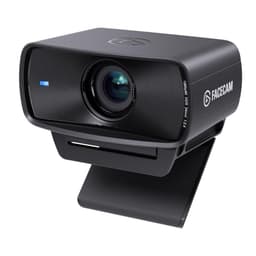
Elgato's webcam range now has three current models: the plug-and-play Facecam Neo, the 1080p60 Facecam MK.2 (sold on Elgato's UK store simply as Facecam) and the flagship Facecam 4K. The older Facecam Pro is listed by Elgato as discontinued, so we've left it out. We've picked the best Elgato webcam for different setups using Elgato's own UK product and spec pages.
The picks at a glance
| Facecam Neo | Facecam MK.2 | Facecam 4K |
|---|
Maximum video | 1080p60 (MJPG) | 1080p60 | 2160p60 (MJPG only) |
HDR | Not listed | Up to 1080p30 | Up to 2160p30 |
Sensor | CMOS 1/2.9" | Sony STARVIS CMOS 1/2.5" | Sony STARVIS 2 CMOS 1/1.8" |
Focus | Autofocus | Fixed (30-120cm) | Fixed (30-120cm at 4K; 25cm to infinity at 1080p) |
Aperture | f/2.0 | f/2.4 | f/4.0 |
Field of view | 77° | 84° | 90° |
Focal length (full-frame equivalent) | 26mm | 24mm | 21mm |
Cable | Fixed USB-C | Detachable USB-C to USB-C 3.0 (180cm) | Detachable USB-C to USB-C 3.0 (200cm) |
Minimum USB | USB 2.0 | USB 2.0 (MJPEG only) | USB 2.0 (up to 1080p60) |
Weight (without mount) | 80g | 90g | 112g |
All three use a 1/4-inch thread for mounting on a tripod or arm, work with Elgato's free Camera Hub software, and list Windows 11 as the minimum Windows version. If you're not sure whether you need 4K at all, our 1080p vs 4K webcam comparison and webcam buying guide explain the trade-offs.
Best for most people: Elgato Facecam MK.2
The Elgato Facecam MK.2 is the one we'd recommend for most streamers and home-office users. It records 1080p at up to 60 frames per second, and Elgato says it sends that video uncompressed when it's connected by USB 3.0, falling back to compressed MJPEG on USB 2.0. HDR works at up to 1080p30, which helps when you have a bright window or lamp behind you.
Inside is a Sony STARVIS CMOS sensor (1/2.5-inch) behind Elgato's Prime lens, with an f/2.4 aperture, a 24mm full-frame-equivalent focal length and an 84° field of view. Focus is fixed, and Elgato tunes it for a range of 30-120cm, so it's designed for someone sitting at a desk rather than moving around a room. A built-in sliding shutter covers the lens when you're not using it, and Elgato Flash Memory stores your camera settings on the device.
There's no microphone: Elgato says it leaves audio to your audio devices, so pair it with a headset or USB mic. The box includes a monitor mount with a 1/4-inch thread and a braided USB-C to USB-C 3.0 cable.
Best for 4K and creators: Elgato Facecam 4K
The Elgato Facecam 4K is the pick if you stream or record at higher resolutions. Over USB 3.0 it supports 2160p60 (MJPG only), 2160p30, 1440p60 and 1440p30 as well as 1080p and lower modes, and HDR works at up to 2160p30. On USB 2.0 it's limited to 1080p60 and below, so plug it into a USB 3.0 Type-C port; our guide to checking USB port speed in Windows 11 shows how to find one.
It uses a larger 1/1.8-inch Sony STARVIS 2 CMOS sensor, an f/4.0 fixed-focus Elgato Prime lens and a wider 90° field of view. Focus range is 30-120cm at 4K and from 25cm to infinity at 1080p. Elgato says it's the first webcam to support lens filters: the front takes standard 49mm filters, such as a polariser or black mist filter.
Like the MK.2, it has no microphone. The privacy cover is a cap rather than a built-in shutter, and the box includes a monitor mount and a detachable 200cm USB-C to USB-C 3.0 cable. For how it compares with a rival 4K webcam, see our Elgato Facecam 4K vs Logitech MX Brio comparison.
Best plug-and-play option: Elgato Facecam Neo
The Facecam Neo is Elgato's simplest webcam. It records 1080p60 or 1080p30 (plus 720p and 540p modes) in MJPG and, unlike the other two, has an autofocus lens with a focus range from 30cm to infinity. That makes it more forgiving if you lean in to show something to the camera or sit further back.
It has a 1/2.9-inch CMOS sensor, an f/2.0 aperture, a 26mm full-frame-equivalent focal length and a 77° field of view. The USB-C cable is fixed rather than detachable, but it only needs a USB 2.0 port, and Elgato lists USB Type-A use with an adapter (not included). At 88 x 32 x 40mm and 80g without its mount, it's also the smallest and lightest of the three. The Neo isn't in our specs database yet.
Which Elgato webcam should you buy?
Video calls and streaming at 1080p: the Facecam MK.2 gives you 1080p60, HDR at 1080p30 and a built-in shutter.
4K recording, wider shots or lens filters: the Facecam 4K, as long as you have a USB 3.0 Type-C port.
Simple setup and autofocus: the Facecam Neo, which works on USB 2.0.
Whichever you choose, good lighting matters as much as the camera; our best Elgato Key Light picks cover Elgato's lights, and our guide to adjusting webcam settings in Windows 11 helps you fine-tune the picture. If you'd rather look at other brands, see our best Logitech webcams and best OBSBOT webcams.