AMD's X870 chipset is the sensible middle of the AM5 range. Compared with B850, it guarantees USB4 and PCIe 5.0 for the graphics card as well as the main SSD. Compared with X870E, it has fewer chipset USB ports and SATA connections, which most single-GPU gaming PCs won't miss. If you're building around a Ryzen 7000 or 9000 processor and want modern ports without paying X870E money, this is the chipset to look at.
This guide compares AMD's chipset specifications and the official specification pages for each board, read on 24 November 2026. We haven't quoted prices, because motherboard prices are moving around Black Friday; check current UK prices at retailers such as Scan, Overclockers and Box before you buy.
Not sure which chipset you need? Our B850 vs X870 and X870 vs X870E comparisons cover the differences, and our best X870E motherboard guide covers the step up.
Our picks at a glance
Award | Board | Networking | M.2 slots | Standout features |
|---|
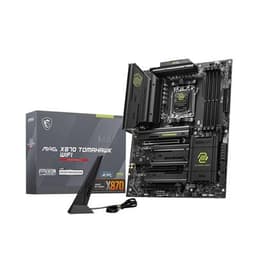
Best overall | MSI MAG X870 Tomahawk WiFi | 5GbE, Wi-Fi 7 (320MHz) | 4 (two PCIe 5.0) | Six system fan headers, debug display |
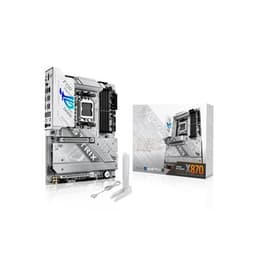
Best for features | ASUS ROG Strix X870-A Gaming WiFi | Intel 2.5GbE, Wi-Fi 7 (160MHz) | 4 (two PCIe 5.0) | 12 rear USB ports, ROG audio, tool-free M.2 and GPU release |
Best value | Gigabyte X870 Eagle WiFi7 | 2.5GbE, Wi-Fi 7 (160MHz) | 3 (one PCIe 5.0) | Simpler layout, Q-Flash Plus |
All three boards are in our specifications database: the MSI MAG X870 Tomahawk WiFi, the ASUS ROG Strix X870-A Gaming WiFi and the Gigabyte X870 Eagle WiFi7.
What every X870 board gets
AMD's AM5 chipset page lists the X870 platform with:
PCIe 5.0 graphics: one x16 or two x8 slots from the processor. B850 only guarantees PCIe 4.0 for graphics.
PCIe 5.0 storage: one x4 PCIe 5.0 NVMe connection plus four general-purpose lanes.
24 PCIe 5.0 lanes out of 36 usable lanes.
USB4 as standard. It's optional on B850 and X670E.
CPU and memory overclocking, including AMD EXPO memory profiles.
Chipset connectivity of up to one 5Gbps, six 10Gbps and one 20Gbps USB port, plus four SATA ports. X870E doubles most of that.
All three boards here are ATX and support Ryzen 7000, 8000 and 9000 processors. Note that Ryzen 8000 desktop chips get fewer PCIe lanes on these boards; each maker lists reduced slot speeds for them.
Best overall: MSI MAG X870 Tomahawk WiFi
MSI's Tomahawk is the most rounded board in this group, with the fastest wired networking and plenty of storage and fan headers. MSI lists:
Memory: four DDR5 slots, up to 256GB, with overclocked speeds listed up to DDR5-8400. It also supports CUDIMM modules in clock driver bypass mode.
Expansion: a PCIe 5.0 x16 slot from the processor, plus a PCIe 4.0 x4 slot and a PCIe 3.0 x1 slot from the chipset.
Storage: four M.2 slots: two PCIe 5.0 x4 from the processor and two PCIe 4.0 from the chipset (one x4, one x2), plus four SATA ports.
Networking: Realtek 5GbE and Wi-Fi 7 with 320MHz channel support, up to 5.8Gbps, plus Bluetooth 5.4.
USB: two 40Gbps USB-C ports on the back, plus a 20Gbps USB-C front-panel connector and plenty of 10Gbps and 5Gbps ports.
Cooling and setup: a CPU fan header, a pump/system header and six system fan headers, EZ Debug LEDs with a digit debug display, and rear Clear CMOS and Flash BIOS buttons.
Audio: Realtek ALC4080.
The catch: MSI says the two rear 40Gbps USB-C ports share PCIe 5.0 bandwidth with the second M.2 slot. When an SSD is fitted in M2_2, both run at PCIe 5.0 x2. You can switch M2_2 to the full x4 in the BIOS, but that disables the 40Gbps ports. Also, the chipset PCI_E3 slot drops to x2 when the M2_3 slot is in use.
Choose it if: you want 5GbE, lots of fan headers and four M.2 slots, and you're happy to plan around the M.2 and USB4 sharing.
Best for features: ASUS ROG Strix X870-A Gaming WiFi
The ROG Strix X870-A is the most polished board here for people who value ports and convenience features. ASUS lists:
Memory: four DDR5 slots, up to 256GB, with overclocked speeds of 8000+ MT/s.
Expansion: one PCIe 5.0 x16 slot from the processor and one PCIe 4.0 x16-length slot (x4 mode) from the chipset.
Storage: four M.2 slots, two of them PCIe 5.0 x4, and two SATA ports.
Networking: Intel 2.5Gb Ethernet and 2x2 Wi-Fi 7 at 160MHz, up to 2.9Gbps, plus Bluetooth 5.4.
USB: 12 rear ports, including two USB4 40Gbps USB-C ports with DisplayPort Alt Mode and a 10Gbps USB-C port with up to 30W fast charging, plus a 20Gbps front USB-C connector.
Audio: ROG SupremeFX with the ALC4080 codec, a Savitech amplifier and optical S/PDIF output.
DIY features: M.2 Q-Latch and Q-Release, a PCIe slot release button, Q-LED diagnostic lights, a pre-mounted I/O shield and a BIOS FlashBack button. Our BIOS FlashBack guide explains how that feature works.
The catch: ASUS says the second PCIe 5.0 M.2 slot (M.2_2) shares bandwidth with the main graphics slot. Fit an SSD there and the graphics slot runs at x8. Using M.2_3 disables the chipset PCIe slot. It also has only two SATA ports, against four on the other two boards.
Choose it if: you want the most rear USB ports, better onboard audio and tool-free building, and you're happy with 2.5GbE.
Best value: Gigabyte X870 Eagle WiFi7
Gigabyte's Eagle is the plainest board here, and that's the point: you still get the X870 essentials of USB4, PCIe 5.0 graphics and PCIe 5.0 storage. Gigabyte lists:
Memory: four DDR5 slots, up to 256GB, with overclocked speeds up to DDR5-8200, and support for both AMD EXPO and XMP profiles.
Expansion: one PCIe 5.0 x16 slot from the processor and two PCIe 3.0 x1 slots from the chipset.
Storage: three M.2 slots: one PCIe 5.0 x4 from the processor and two PCIe 4.0 from the chipset, plus four SATA ports. The M2B_SB slot drops to x2 when M2C_SB is in use.
Networking: Realtek 2.5GbE and Wi-Fi 7 at 160MHz with Bluetooth 5.4. The Wi-Fi chip depends on the board revision: MediaTek MT7925 on revision 1.0, Realtek RTL8922AE on revision 1.1.
USB: two rear USB4 Type-C ports with DisplayPort output, one 10Gbps Type-A, three 5Gbps and four USB 2.0 ports, plus an internal 20Gbps USB-C header.
BIOS: a rear Q-Flash Plus button, plus Q-Flash and Smart Backup support.
Fans: a CPU fan header, a CPU fan/pump header and four system fan headers.
The catch: fewer headline extras. It has one PCIe 5.0 M.2 slot rather than two, fewer fan headers and fewer rear USB ports than the MSI and ASUS boards, and only x1 expansion slots besides the main graphics slot. Gigabyte also notes that the main PCIe x16 slot can take a graphics card or an NVMe SSD, and that a single graphics card should go in that slot.
Choose it if: you want a straightforward X870 build with USB4 and Wi-Fi 7 and don't need lots of extra M.2 slots, expansion cards or fans.
How to choose between them
Count your SSDs. If you'll fit more than two NVMe drives, the MSI and ASUS boards have four M.2 slots. Read the sharing notes above before deciding which slot gets which drive.
Decide what matters more: full-speed USB4 or a second PCIe 5.0 SSD. On the MSI, using M2_2 halves the USB4 ports' PCIe link unless you change it in the BIOS. On the ASUS, using M.2_2 halves the graphics slot. If you'd rather keep both at full width, put a second drive in one of the PCIe 4.0 chipset slots instead.
Check your network. Only the MSI has 5GbE. If your home network is 1GbE or 2.5GbE, that doesn't matter yet. Our 2.5GbE vs 5GbE comparison explains when it does.
Plan memory. All three support up to 256GB of DDR5 across four slots. See our best DDR5 RAM for AM5 guide for kits.
Update the BIOS. All three have a rear BIOS flash button (MSI's Flash BIOS, ASUS's BIOS FlashBack and Gigabyte's Q-Flash Plus). It's worth updating to the latest BIOS before or soon after building; our guide to updating the BIOS safely walks through it.
Our verdict
The MSI MAG X870 Tomahawk WiFi is our pick for most AM5 builders: it combines X870's PCIe 5.0 graphics and USB4 with 5GbE, Wi-Fi 7 at 320MHz, four M.2 slots and six system fan headers. Just remember that fitting an SSD in its second PCIe 5.0 M.2 slot halves the bandwidth to the rear 40Gbps ports by default. The ASUS ROG Strix X870-A Gaming WiFi is the better choice if you want the most rear USB ports, stronger onboard audio and tool-free M.2 and GPU release, while the Gigabyte X870 Eagle WiFi7 covers the X870 essentials with a simpler feature set.