You don't need a subscription to analyse your chess games with a world-class engine. The strongest chess engines, Stockfish and the neural-network engine Leela Chess Zero (Lc0), are free and open source, and so are several excellent desktop apps that run them on your own PC. That means your CPU and graphics card do the work, with no daily limits. We've picked the best free options for different kinds of player, based on each project's official documentation and feature lists.
The quick list
App | Best for | Platforms | Licence |
|---|
En Croissant | Best overall: analysis, game import and opening training | Windows, macOS, Linux | Open source (GPL-3.0) |
Nibbler | Best for Leela Chess Zero analysis | Windows, Linux (Mac builds by contributors) | Open source (GPL-3.0) |
BanksiaGUI | Most features: tournaments, databases, opening books | Windows, macOS, Linux | Freeware |
Cute Chess | Engine-vs-engine matches and testing | Binaries on GitHub, or build from source (Qt) | Open source (GPLv3+) |
ChessBase Reader 2017 | Opening ChessBase databases and training titles | See ChessBase's download page | Free download |
You'll also want at least one engine. Stockfish 19, released on 5 September 2026, is the strongest engine on the independent CCRL Blitz rating list and runs on any CPU. Leela Chess Zero runs best on a graphics card. Our Leela Chess Zero vs Stockfish comparison explains the difference, and our Lc0 setup guide covers getting Leela running on your GPU.
1. En Croissant: best overall
En Croissant describes itself as an open-source, cross-platform chess GUI that aims to be powerful, customisable and easy to use, and it's the one we'd suggest to most players. Its features include:
Game analysis reports, with a graph of the evaluation over time, a heatmap of the board and a list of the best moves.
A personal database that imports your games from both Lichess and Chess.com and keeps them up to date in one place.
A built-in download manager that fetches the latest engines and databases in a click. The Lc0 project's guide confirms that on Windows you can go to Engines and select lc0 to have En Croissant download it ready to use.
Multi-engine analysis with any UCI engine, so you can run Stockfish and Leela side by side.
Repertoire training with spaced repetition, plus position search in your database.
Browser extensions for Firefox and Chrome that open finished Chess.com and Lichess games in the desktop app.
Choose it if you play online and want one free app for reviewing games, building an opening repertoire and running engines locally.
2. Nibbler: best for Leela Chess Zero
Nibbler is a real-time analysis GUI for Leela Chess Zero. Its README says it runs Leela in the background and constantly displays its opinions about the current position, with Leela's top choices shown graphically on the board. Features include a win-rate graph, optional Leela statistics (such as N, P, Q and WDL) for each move, automatic full-game analysis, playing against Leela from any position, PGN and FEN loading and Chess960 support.
Setup is simple: choose Engine, then Choose engine, and pick lc0.exe. Ctrl+G starts analysis and Ctrl+H stops it. Nibbler "more-or-less" works with Stockfish too, according to its README, which advises setting MultiPV to 1 and setting Threads and Hash for maximum strength. Windows and Linux builds are on its GitHub releases page, where v2.5.8 is the latest. Mac builds are made by other contributors.
Choose it if you have a gaming GPU and want to see what a neural-network engine thinks of your games.
3. BanksiaGUI: most features
BanksiaGUI is freeware for Windows, macOS and Linux, and its developers call it the richest-featured chess GUI around. It covers playing, running tournaments, editing games, creating and viewing databases, opening books, connecting to other computers on a local network and connecting to chess servers, as well as analysis. It also has features specifically for Lc0: per the Lc0 project's guide, you can drag lc0.exe onto the window to install it, then tick LogLiveStats, VerboseMoveStats and UCI_ShowWDL to show Leela's statistics and a win/draw/loss chart.
Choose it if you want a single free app that also runs engine tournaments and manages opening books.
4. Cute Chess: for engine matches
Cute Chess is a graphical interface, a command-line tool and a library for playing chess, written in C++ with the Qt framework and released under the GPLv3+ licence (except for some bundled components). Its cutechess-cli program plays games between chess engines with set time controls and numbers of rounds, which makes it useful for comparing engines, networks or settings on your own hardware. In the GUI, you can also pick an engine as your opponent in the play dialog. Adding Lc0 takes a few clicks under Tools, Settings, Engines.
Choose it if you want to pit engines or network files against each other rather than review your own games.
5. ChessBase Reader 2017: for ChessBase files
ChessBase's own analysis software is paid, but its free ChessBase Reader 2017 opens standard ChessBase and PGN files (.cbh, .cbf and .pgn), plays through games and shows ChessBase training videos. It isn't a full analysis suite like the others here, but it's worth having if you've bought ChessBase training titles or databases.
What hardware do you need?
Chess analysis is a good way to use hardware you already have, and it doesn't need much.
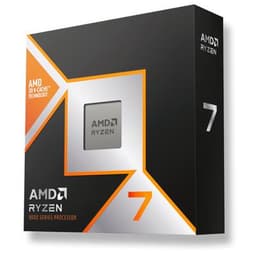
Stockfish uses your CPU and RAM. Its FAQ recommends setting Threads to your maximum minus one or two, and setting the hash to 64 or 128MB for shallow analysis, or as much as you can spare for deep analysis. It can't use a GPU. Stockfish 19's universal binaries pick the best code path for your CPU automatically. Our suggestion: an eight-core chip such as the AMD Ryzen 7 9800X3D (8 cores, 16 threads) is plenty for home analysis. See our best CPU guide for more choices.
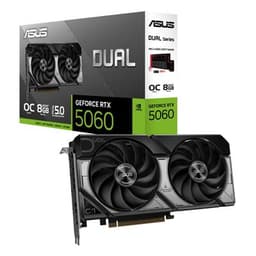
Leela Chess Zero uses your GPU. The Lc0 project's recommended networks need about 1.6GB to 4GB of GPU memory, so an 8GB card such as the ASUS RTX 5060 8GB Dual OC can run the largest. Intel and AMD cards are supported through the ONNX-DML build on Windows, so an Intel Arc B580 Limited Edition 12GB works too. That's our suggestion, based on Lc0's requirements, not something we've tested. For games and other AI apps you'll want more, as our how much VRAM do you need guide explains.
Laptops and ARM PCs are fine for Stockfish, which has Windows on ARM builds. Lc0's official builds don't currently support ARM-based Windows machines.