Black Friday is peak season for pre-built gaming PC deals, and the listings are designed to impress: a big graphics card name, a fast-sounding processor and plenty of RGB. What they don't always make clear is which version of the graphics card you're getting, how the memory is configured, or what power supply is inside. This guide shows you what to check in a UK pre-built listing, what to ask the seller if it isn't stated, and what your rights are if the PC isn't what you expected.
1. The graphics card: check the exact model and memory
The graphics card matters most for gaming, so look past the headline name.
Check the VRAM. Some GPUs come in more than one memory configuration. NVIDIA, for example, lists the GeForce RTX 5060 Ti with either 16 GB or 8 GB of GDDR7. A listing that just says "RTX 5060 Ti" could be either, and the 8 GB version leaves less headroom for demanding games at high settings and resolutions. If the listing doesn't state the VRAM, ask before you order.
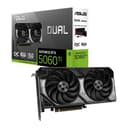
Check the brand and model of the card. "RTX 5060 Ti" tells you the GPU, not the card. A named partner model, such as the ASUS RTX 5060 Ti 8GB Dual OC, lets you look up its size, cooler and power requirements.
Be wary of vague wording such as "RTX graphics", "up to" or "or equivalent", which can let a builder swap in a different card.
Not sure which GPU tier you need? See how to choose a graphics card.
2. The processor: model number, not just the family
"Intel Core i7" or "Ryzen 7" covers several generations. You need the full model number to know what you're getting. Some processors are only sold in pre-built systems: we've covered that with the Intel Core Ultra 7 260K, for example. Look the exact model up on Intel's or AMD's site and make sure it's a current generation, then check that the cooler is described: a named tower cooler or AIO is a good sign; "standard cooler" is worth asking about.
3. Memory: capacity, speed and number of sticks
For a gaming PC in 2026, 16GB is a sensible minimum and 32GB is comfortable for heavier games and multitasking; our guide to how much RAM a gaming PC needs explains why.
Two other details matter:
Number of sticks. Two matched sticks (for example 2 x 16GB) run in dual-channel mode on mainstream desktop platforms, which gives the processor more memory bandwidth than a single stick of the same total capacity. A listing that says "32GB (1 x 32GB)" or doesn't say at all is worth querying.
Speed and profile. Check the rated speed, and when the PC arrives, check that the XMP or EXPO profile is enabled in the BIOS; our XMP/EXPO guide shows how.
4. Storage: SSD type and capacity
Look for an NVMe SSD rather than a SATA SSD or hard drive as the main drive, and at least 1TB if you play several large games. If the listing only says "1TB SSD", ask whether it's NVMe, and which brand. Our NVMe vs SATA SSD comparison explains the difference.
5. The power supply: the most commonly hidden part
Budget pre-builts sometimes save money on the power supply, and it's often listed only as "650W PSU" with no brand. Ask for the brand, model and efficiency rating. A known brand with an 80 Plus or Cybenetics rating gives you some reassurance, and enough headroom matters if you might upgrade the graphics card later. Our guide to calculating PSU wattage will tell you whether the quoted wattage is sensible, and how to check what PSU you have helps once the PC arrives.
6. Motherboard, case and upgrade room
Check the motherboard chipset and form factor, how many free RAM slots and M.2 slots it leaves you, and whether the case has decent airflow (a mesh front panel and several fans). These details decide how easy future upgrades will be; our guide to upgrading a pre-built gaming PC explains what to look for.
7. Windows, warranty and support
Windows licence: check that Windows is installed and activated, and which edition.
Warranty: look for how long the warranty lasts, whether it covers parts and labour, and whether you'd have to send the whole PC back (and who pays for collection).
Upgrade rules: ask whether opening the case or adding parts affects the warranty.
Your rights when buying online in the UK
GOV.UK's guidance for retailers says that customers who buy online, by mail or by phone can cancel their order within 14 days of receiving the item, without giving a reason, and then have another 14 days to return it. The retailer must refund within 14 days of getting the item back, including standard delivery costs. GOV.UK also says customers have exactly the same refund rights for items bought in a sale as at full price, and must be offered a full refund if an item is faulty or not as described.
GOV.UK lists personalised or custom-made items among the exceptions to the right to cancel, so if you customise a PC heavily on a configurator, read the retailer's cancellation terms before you order.
A quick checklist
Exact GPU model, including VRAM (8 GB or 16 GB?)
Full CPU model number and named cooler
RAM capacity, speed and number of sticks
NVMe SSD, brand and capacity
PSU brand, model, wattage and efficiency rating
Motherboard chipset, free slots and case airflow
Windows edition, warranty length and terms
If you still can't decide between buying ready-made or building, read pre-built vs custom gaming PC, and see our best pre-built gaming PC guide and UK pre-built Black Friday deals coverage. We haven't quoted prices because they're changing daily over Black Friday.
Our verdict
The best pre-built deal is the one whose full spec you know. Before you order, confirm the exact graphics card and its VRAM, the full CPU model, how the RAM is configured, what kind of SSD it uses and, above all, which power supply is inside. If a seller won't tell you, treat that as a warning sign.
When the PC arrives, check that what's inside matches the listing, and remember that buying online in the UK gives you 14 days to change your mind after delivery. Use that window to make sure the PC is what you paid for.