A local coding assistant is only as good as the model behind it. Apps such as Continue, Cline, OpenCode and Claude Code can all talk to a model running on your own PC through Ollama, but which model you load decides whether you get useful multi-file edits or confident nonsense, and whether it fits in your graphics card's memory at all.
This guide picks the best coding models you can download through Ollama right now, matched to the hardware you're likely to have. Download sizes, context windows, parameter counts and licences come from each model's official Ollama library page, read on 27 November 2026. Where we quote benchmark scores, they're the model makers' own results as published on those pages, not independent tests. If you're still choosing the app rather than the model, see our guide to the best local AI coding assistants.
Our picks at a glance
Pick | Model | Download (Ollama) | Context window | Best for |
|---|
Best overall | Qwen3-Coder 30B | 19GB | 256K | 24GB graphics cards |
Best for 16GB cards | gpt-oss 20B | 14GB | 128K | Reasoning through bugs |
Best for agents | Devstral Small 2 24B | 15GB | 384K | Multi-file editing with tools |
Best for 8GB cards and laptops | MiMo-V2.6 9B | 6.6GB to 8.7GB | 256K | Small machines, screenshots |
Lightest | Rnj-1 8B | 5.1GB | 32K | Older or entry-level GPUs |
Best for big-memory PCs | Qwen3-Coder-Next | 52GB (q4_K_M) | 256K | 64GB+ unified memory or multi-GPU |
Long-context alternative | North Mini Code 1.0 | 19GB (q4_K_M) | 256K (Cohere's figure) | Repository-scale agent work |
The download size is the model file, not the total memory it needs. You also need room for the context (the code and conversation the model is holding), which grows as you feed it more files. Our explainer on LLM context length and VRAM covers why, and our guide to setting Ollama's context length shows how to change it.
Best overall: Qwen3-Coder 30B
Alibaba's Qwen3-Coder is the default pick if you have a 24GB graphics card. The Ollama page describes the 30B version as having 30 billion total parameters with only 3.3 billion active, which is what makes a model this capable practical on a single consumer GPU. The download is 19GB and it supports a 256K-token context window natively, which the page says is aimed at understanding whole repositories.
It's built for agentic work, meaning it can call tools, read files and make changes rather than just completing a line, and Ollama's page lists ready-made ollama launch commands for Claude Code, OpenCode and other agents. A 19GB file leaves a 24GB card a few gigabytes for context, so very long sessions will still spill into system memory. On a 16GB card the file alone doesn't fit, so look at the next two picks instead. Our best 24GB graphics cards for local AI guide covers the cards that suit it.
There is also a 480B version, but the Ollama page says running it locally requires at least 250GB of memory or unified memory, which puts it out of reach of normal PCs.
Best for 16GB cards: gpt-oss 20B
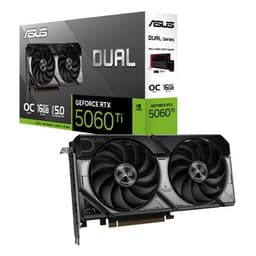
OpenAI's gpt-oss 20B is a 14GB download with a 128K context window, which makes it the best fit for 16GB cards such as the ASUS RTX 5060 Ti 16GB Dual OC. It isn't a coding specialist, but its Ollama page highlights agentic features (function calling and structured outputs), full access to its chain of thought and adjustable reasoning effort (low, medium or high). That makes it good for working through a bug step by step, where you can read how it reached its answer.
The page says the models' mixture-of-experts weights are quantised to MXFP4, about 4.25 bits per parameter, which is why the 20B model is so compact. It's released under the Apache 2.0 licence. Our guide to running gpt-oss locally walks through the setup.
Best for agents: Devstral Small 2
Devstral Small 2 is a 24B model that its Ollama page says "excels at using tools to explore codebases, editing multiple files and power software engineering agents". It's a 15GB download, accepts images as well as text, and Ollama lists a 384K context window for the local version. It's Apache 2.0 licensed and needs Ollama 0.13.3 or later.
The benchmark table on the page gives Devstral Small 2 65.8% on SWE-bench Verified, a test based on fixing real GitHub issues, against 72.2% for the much larger Devstral 2. Treat those as published figures from the model page, not independent tests. A 15GB file is a tight squeeze on a 16GB card once you add context, so it's happiest on 20GB or 24GB. We compared it directly with Qwen3-Coder in Devstral Small 2 vs Qwen3-Coder.
Best for 8GB cards and laptops: MiMo-V2.6 9B
Xiaomi's MiMo-V2.6 is a recent addition: its Ollama page was updated three weeks before we checked. It's a 9B model fine-tuned from Qwen3.5-9B for "code and agent workflows", with downloads of 6.6GB to 8.7GB depending on the version, a 256K context window, image input, thinking and tool use. The page suggests uses including investigating failures, drafting fixes and using screenshots to guide an implementation.
Xiaomi reports 61.1 on SWE Verified for MiMo-V2.6 against 60.0 for the Qwen3.5-9B model it's based on, and bigger gains on agent tests such as Terminal Bench 2.1 (37.1 against 27.0). It's MIT licensed. On an 8GB card, choose the smaller download and keep the context modest; our guide to running a local LLM on 8GB of VRAM explains the trade-offs.
Lightest: Rnj-1 8B
Essential AI's Rnj-1 is an 8B dense model trained from scratch and "optimized for code and STEM", according to its Ollama page. At 5.1GB it's the smallest download here, so it suits older 6GB and 8GB cards or laptops with integrated graphics. The catch is a 32K context window, much shorter than the other picks, so it's better for questions about a file or function than for an agent roaming a whole project. It needs Ollama 0.13.3 or later.
Best for big-memory PCs: Qwen3-Coder-Next
If you have a machine with 64GB or more of fast memory, such as a Ryzen AI Max+ mini PC, a multi-GPU workstation or a desktop with lots of RAM for offloading, Qwen3-Coder-Next is the step up. The Ollama page says it has 80B total parameters with 3B active per token, a 256K native context window, and works with coding agents including Claude Code, Qwen Code, Cline and OpenCode out of the box. The q4_K_M download is 52GB and the q8_0 version is 85GB.
It runs in non-thinking mode only, so it answers without a long reasoning preamble. Because only a small part of the model is active for each token, it's a good candidate for splitting between GPU and system memory; our guide to running MoE models on low VRAM explains how that works.
Owners of 96GB-plus machines could also consider Devstral 2, the 123B model in the same family, which is a 75GB download with a 256K context window on Ollama.
Long-context alternative: North Mini Code 1.0
Cohere's North Mini Code is a 30B mixture-of-experts model with 3B active parameters, built for agentic software engineering. Its Ollama readme says it supports 256K context with up to 64K output tokens and was trained across several agent harnesses, including OpenCode. The q4_K_M download is 19GB and q8_0 is 32GB, so it competes directly with Qwen3-Coder 30B for a 24GB card. It's worth trying if Qwen3-Coder doesn't suit your agent or codebase.
Not local: Kimi K2.7 Code
You'll see Moonshot AI's Kimi K2.7 Code in Ollama's search results for coding models, but its library page only lists a cloud version. That runs on Ollama's servers, not your PC, so it doesn't belong in a local setup.
How to choose
Match the file to your VRAM first. Leave at least a few gigabytes free for context. If you're not sure how much memory you have, see our guide to how much VRAM you need.
Pick an agent model for agents. If you use Cline, OpenCode or Claude Code to edit files, prefer models that list tool support, such as Qwen3-Coder, Devstral Small 2, MiMo-V2.6 or North Mini Code.
Raise the context window. Coding agents send a lot of text, and a short context window causes them to forget files mid-task.
Check the licence for work use. gpt-oss and Devstral Small 2 are Apache 2.0 and MiMo-V2.6 is MIT, according to their pages.
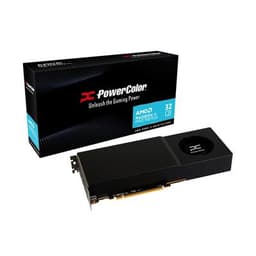
Want more memory? A 32GB card such as the PowerColor AI Pro R9700 32GB or the NVIDIA GeForce RTX 5090 Founders Edition gives far more room for context with the 19GB models.
Our verdict
For most people with a 24GB graphics card, Qwen3-Coder 30B is the best local coding model: it's built for agents, has a 256K context window and only 3.3B of its 30B parameters are active at once. On a 16GB card, gpt-oss 20B fits with a little room for context and is good at reasoning through bugs, while Devstral Small 2 is the agent specialist if you can spare a little more memory. MiMo-V2.6 9B is the pick for 8GB cards and laptops, and Qwen3-Coder-Next is worth the 52GB download if you have a big-memory machine. Whatever you choose, give it a generous context window.