"3D modelling" covers two very different jobs. Artists sculpting characters, building game assets or rendering scenes want a mesh modeller and renderer. Makers designing a 3D-printed bracket, a PC case mod or a shelf want precise CAD with real-world dimensions. The best free tool depends on which camp you're in, and the free licences vary from truly open source to time-limited personal-use plans. We've picked five free options for Windows PCs, based on each developer's own website and licence terms as checked on 28 November 2026.
Quick picks
Software | Best for | Type | Free licence terms |
|---|
Blender | 3D art, animation, rendering | Mesh modelling and rendering suite | Free and open source (GPL), any purpose including commercial |
FreeCAD | Precise parts and engineering | Parametric CAD | Open source, no licensing fees or sign-up |
Autodesk Fusion for personal use | Hobby CAD and 3D printing | Cloud-based parametric CAD | Free for qualifying non-commercial users, renewed yearly |
SketchUp Free | Rooms, furniture, quick concepts | Browser-based modeller | Free web version |
OpenSCAD | Programmers and parametric parts | Code-driven solid CAD | Free software |
Best overall for 3D art: Blender
Blender is the obvious first download for anyone interested in 3D graphics. The Blender Foundation describes it as free and open source software, forever, released under the GNU General Public License, and says you're free to use it for any purpose, including commercially or for education. It's a community project coordinated by the Blender Foundation and primarily funded by donations.
For PC builders, Blender's published system requirements are the most useful part. For Windows, Blender lists:
| Minimum | Recommended |
|---|
OS | Windows 8.1 (64-bit) | Windows 11 |
CPU | 4 cores with SSE4.2 support | 8 cores |
RAM | 8 GB | 32 GB |
GPU | 2 GB VRAM with OpenGL 4.3, Vulkan 1.3 | 8 GB VRAM |
Blender's supported graphics list covers NVIDIA GeForce 900 and newer, AMD GCN 4th gen and newer, and Intel Kaby Lake architecture and newer, and the project tells users to install the latest drivers from the graphics card maker. GPU rendering in its Cycles renderer has its own requirements described in the Blender manual. Blender also recommends a minimum display resolution of 1920x1080 and a three-button mouse, and supports pen tablets for sculpting and painting.
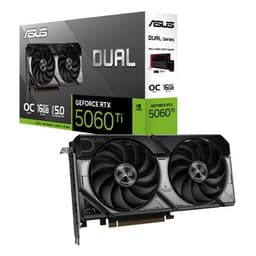
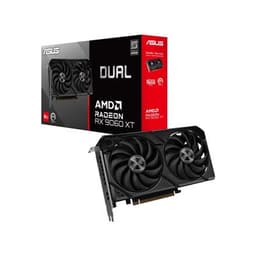
That 8 GB VRAM recommendation is easy to meet with current mid-range cards. 16GB cards such as the ASUS RTX 5060 Ti 16GB Dual OC and ASUS RX 9060 XT 16GB Dual, or the 12GB Intel Arc B580 Limited Edition 12GB, clear it with room to spare; check Blender's Cycles documentation for which GPU rendering back end your card uses. Our best GPU for video editing guide covers creative workloads in more depth. Blender is also portable: the project says it can run from a USB stick or a desktop folder with no installation and no internet connection required.
Choose it if you want to model, sculpt, texture, animate or render. Skip it if you need dimensionally precise mechanical parts; a CAD tool is a better fit.
Best for precise parts: FreeCAD
FreeCAD describes itself as an open-source parametric 3D modeller made primarily to design real-life objects of any size. Parametric means your design is built from a history of steps and parameters, so you can go back and change a dimension and the model updates. Its developers stress there are no licensing fees and no vendor lock-in, and the home page promises "no sign-up, no paywall, no restrictions".
According to FreeCAD, it:
Runs on Windows, Mac and Linux.
Reads and writes many open formats, including STEP, IGES, STL, SVG, DXF, OBJ, IFC and DAE.
Uses real-world units throughout and can export models for 3D printing or CNC machining, create 2D drawings and run analyses such as Finite Element Analysis.
Includes a constraint-based 2D sketcher as the main building block for 3D parts.
Added a built-in assembly workbench and a built-in BIM workbench for building and construction work with version 1.0.
Can be scripted and extended with Python.
Choose it if you want a fully free desktop CAD tool for parts, enclosures, mounts or 3D-printed PC accessories, and you don't mind a learning curve. Skip it if you want the most polished beginner experience; Fusion's personal plan is friendlier for many hobbyists, with strings attached.
Best free hobby CAD: Autodesk Fusion for personal use
Autodesk Fusion is professional cloud CAD, and Autodesk offers a limited free version for hobbyists. Autodesk says Fusion for personal use includes free cloud-based design and 3D modelling tools, and is free for qualifying non-commercial users as a one-year subscription. The conditions matter:
It's for personal, home-based, non-commercial projects only.
It's limited to individuals generating less than $1,000 USD a year, and isn't for use in primary employment, company environments or commercial training.
Users who exceed that revenue or use it for commercial projects must move to a paid subscription.
You need to sign in with or create an Autodesk account to download it.
Compared with the full product, Autodesk lists limited CAM, limited electronics and PCB design, limited 2D drawings, single-user data management, limited import/export file types and forum-only support.
Choose it if you're a hobbyist designing parts for a 3D printer and want a polished commercial CAD tool without paying for it. Skip it if you want software you can use for paid work or keep using without an account; FreeCAD has no such restrictions.
Best for quick concepts in a browser: SketchUp Free
SketchUp Free from Trimble runs in your web browser, so there's nothing to install. Trimble describes it as the simplest free 3D modelling software on the web, with SketchUp's core modeller running in the browser. The free plan includes:
Import of SKP, JPG and PNG files, and export to SKP, PNG and STL.
10 GB of Trimble Connect cloud storage for sharing projects.
Access to 3D Warehouse, a library of user-generated and manufacturer-produced models.
STL export means simple designs can go to a 3D printer, and 3D Warehouse is handy for dropping ready-made furniture or objects into a room layout.
Choose it if you want to sketch a room, a desk setup or a piece of furniture quickly. Skip it if you'd rather work in a desktop app or need engineering-grade CAD.
Best for programmers: OpenSCAD
OpenSCAD calls itself "The Programmers Solid 3D CAD Modeller". It's free software for creating solid 3D CAD objects and is available for Windows, Linux/UNIX and macOS. Rather than dragging shapes around, you describe the model in a script, which makes it easy to change one variable and regenerate a part. The project links a user manual and tutorial, ready-made libraries and a cheat sheet from its home page, and points to OpenSCAD designs shared on sites such as Printables and Thingiverse.
Choose it if you think in code and want repeatable, parametric parts such as fan grilles, cable clips or brackets. Skip it if you want to model visually.
Which free 3D software should you choose?
Making art, game assets or renders: Blender.
Designing real parts with no account or licence limits: FreeCAD.
Hobby 3D printing with a polished CAD workflow: Autodesk Fusion for personal use, as long as you meet its non-commercial terms.
Room or furniture layouts in minutes: SketchUp Free.
Parametric parts written as code: OpenSCAD.
You may well end up using two: a CAD tool for parts and Blender for presentation renders. If you're more interested in generating 3D models from text or images with AI, see our separate guide to the best local AI 3D model generators, and Blender's newest features are covered in our Blender 5.3 news story.