It's based on NVIDIA's GeForce RTX 50 Series specification pages, AMD's Radeon RX 9070 XT specifications and Blackmagic Design's DaVinci Resolve product pages, all read on 26 November 2026. For real-world results in your editor, look for independent reviews that test the software you use.
Your graphics card does a lot more in a video editor than drive your monitor. Modern editors use the GPU to process effects and colour grades, run AI tools and decode and encode video in dedicated hardware. Blackmagic Design says DaVinci Resolve Studio has over 100 GPU- and CPU-accelerated Resolve FX, and that its DaVinci AI Neural Engine uses the latest GPU innovations for AI and deep learning, powering features such as facial recognition, object detection, smart reframing, speed warp retiming, super scale and auto colour. NVIDIA, for its part, pitches the ninth-generation NVIDIA Encoder (NVENC) in its RTX 50 Series cards at faster video exports and AI-driven effects in DaVinci Resolve, Adobe Premiere and other editors.
So which graphics card should you buy for editing? It comes down to three things: video memory, the hardware video engines and how much power your PC can supply.
What matters in a video editing GPU
Video memory (VRAM). Higher-resolution footage, long timelines, heavy effects and AI tools all use video memory. If you edit 4K or higher, or use a lot of GPU effects and noise reduction, 16GB is a sensible target. 8GB cards can work for 1080p editing, but they leave little headroom.
Hardware encoders and decoders. NVENC (encode) and NVDEC (decode) are dedicated video engines on NVIDIA cards; AMD cards have their own media engine. Decoders help with smooth playback of compressed footage, and encoders speed up exports in supported formats. NVIDIA's higher-end RTX 50 cards have more than one NVENC engine, which can help in software that's able to use them. Whether your editor uses more than one encoder for a single export depends on the software and its settings, so check its documentation.
AV1 support. All the cards in this guide support AV1 encode and decode, according to NVIDIA and AMD. AV1 is increasingly used for uploads and streaming, so hardware support is worth having.
Power. A bigger card needs a bigger power supply. We list NVIDIA's required system power and AMD's minimum PSU recommendation for each pick.
Quick picks
Pick | GPU | Memory | NVENC / NVDEC (or AMD encode) | Power rating | Recommended PSU |
|---|
Best overall | GeForce RTX 5070 Ti | 16GB GDDR7, 256-bit | 2x / 1x (ninth gen / sixth gen) | 300W TGP | 750W |
Best value | GeForce RTX 5060 Ti 16GB | 16GB GDDR7, 128-bit | 1x / 1x | 180W TGP | 600W |
Step up | GeForce RTX 5080 | 16GB GDDR7, 256-bit | 2x / 2x | 360W TGP | 850W |
Best for 8K and heavy projects | GeForce RTX 5090 | 32GB GDDR7, 512-bit | 3x / 2x | 575W TGP | 1000W |
Best AMD | Radeon RX 9070 XT | 16GB GDDR6, 256-bit | H.264, HEVC and AV1 encode and decode | 304W board power | 750W |
NVIDIA figures are total graphics power (TGP) and required system power for its reference specifications; AMD's are board power and minimum PSU recommendation. Partner cards may differ.
Best overall: NVIDIA GeForce RTX 5070 Ti
The RTX 5070 Ti hits the sweet spot for most editors. NVIDIA's specs give it 16GB of GDDR7 on a 256-bit interface, two ninth-generation NVENC encoders and one sixth-generation NVDEC decoder, with AV1 encode and decode. That's double the encoders of the RTX 5070 and RTX 5060 Ti, and 16GB of memory gives you room for 4K timelines with effects.
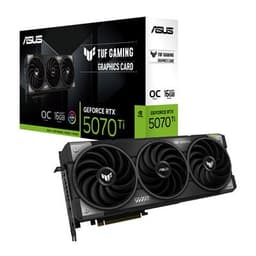
NVIDIA rates it at 300W total graphics power with a 750W required system power, which most mid-range and high-end builds can supply. It's a sensible choice for creators who also game. Partner cards include the MSI RTX 5070 Ti 16GB Ventus 3X OC and ASUS RTX 5070 Ti 16GB TUF Gaming OC.
Best value: NVIDIA GeForce RTX 5060 Ti 16GB
If your budget is tighter, the 16GB version of the RTX 5060 Ti is the one to get. NVIDIA lists the RTX 5060 Ti with 16GB or 8GB of GDDR7 on a 128-bit interface, and for editing the 16GB version is clearly the better buy. It has one NVENC encoder and one NVDEC decoder, both of the same generations as the bigger cards, with AV1 support.
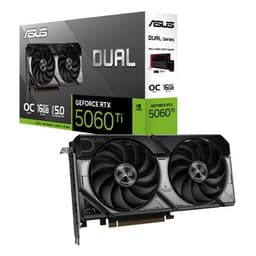
It's also efficient: NVIDIA rates it at 180W total graphics power, with a 600W required system power, so it suits smaller builds and upgrades to older PCs with modest power supplies. The narrower 128-bit memory interface and single encoder mean it won't keep up with the RTX 5070 Ti in heavy projects, but it's a capable 1080p and 4K editing card. See the ASUS RTX 5060 Ti 16GB Dual OC spec page.
Step up: NVIDIA GeForce RTX 5080
The RTX 5080 has the same 16GB of GDDR7 and 256-bit interface as the RTX 5070 Ti, but NVIDIA gives it two NVDEC decoders as well as two NVENC encoders. If you work with several streams of compressed footage at once, such as multicam edits, the second decoder is the main reason to choose it over the RTX 5070 Ti for editing.
NVIDIA rates it at 360W total graphics power and an 850W required system power. Because its memory capacity is the same as the RTX 5070 Ti, it's not the upgrade to buy if you're running out of VRAM. See the NVIDIA GeForce RTX 5080 Founders Edition spec page.
Best for 8K and heavy projects: NVIDIA GeForce RTX 5090
The RTX 5090 is the card for professional workloads at home. NVIDIA gives it 32GB of GDDR7 on a 512-bit interface, three ninth-generation NVENC encoders and two sixth-generation NVDEC decoders. That's twice the memory of any other card in this guide, which matters for 8K footage, long timelines with heavy effects and AI tools that load large models.
It needs serious power: NVIDIA rates it at 575W total graphics power with a 1000W required system power, and it uses four PCIe 8-pin cables through an adapter or one 600W PCIe Gen 5 cable. For most editors it's more than they need, but if you regularly hit memory limits on a 16GB card, it's the only GeForce option with more. See the NVIDIA GeForce RTX 5090 Founders Edition spec page.
Best AMD: AMD Radeon RX 9070 XT
AMD's Radeon RX 9070 XT is the strongest alternative to NVIDIA here. AMD's specification page lists 16GB of GDDR6 on a 256-bit interface with up to 640GB/s of bandwidth, 64 compute units and hardware H.264, HEVC and AV1 encode and decode. AMD gives a 304W board power and a 750W minimum PSU recommendation.
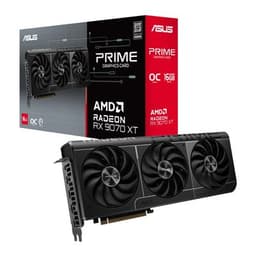
Before you buy, check that your editor, plug-ins and any AI tools you rely on support AMD graphics, as software support can differ between GPU makers. DaVinci Resolve itself runs on Mac, Windows and Linux, according to Blackmagic Design. See the ASUS RX 9070 XT 16GB Prime OC spec page.
Don't forget the rest of your PC
A graphics card is only part of an editing PC. Fast storage matters for footage and cache files, and our best SSD for video editing guide covers that. A colour-accurate display helps with grading: see our best monitor for photo editing guide, as the same panels suit video. If you're choosing software, our best free video editing software roundup compares the options. And if you also stream or record gameplay, our NVENC vs x264 in OBS explainer covers hardware encoding in more depth.
Our verdict
For most people editing video in 2026, the GeForce RTX 5070 Ti is the best graphics card: NVIDIA gives it 16GB of GDDR7, two ninth-generation NVENC encoders and AV1 support at 300W. The RTX 5060 Ti 16GB is the value pick at 180W, but buy the 16GB version, not the 8GB one. Choose the RTX 5080 if you need its second decoder for multicam work, and the RTX 5090 only if you need 32GB of memory for 8K or very heavy projects. AMD's RX 9070 XT, with 16GB and AV1 encode and decode, is a strong alternative if your editor and plug-ins support it well.