
Skip to content

Best PicksSSD

Best SSD for Video Editing in 2026: Fast, High-Capacity Picks

The best SSDs for video editing on maker specs: Samsung 990 PRO 4TB (up to 7,450MB/s, 2,400TBW), WD_BLACK SN850X 8TB (4,800TBW), Samsung 9100 PRO 8TB for PCIe 5.0 builds, and the Samsung T9 4TB portable SSD for moving footage.

By , Buying Guides & Peripherals Editor

3 min read

Best SSD for Video Editing in 2026: Fast, High-Capacity Picks

Our picks at a glance

  1. 1
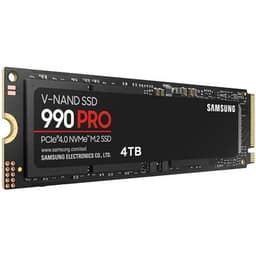
    Samsung SSD 990 Pro M.2 4TB
    Samsung SSD 990 Pro M.2 4TB
  2. 2
    WD_BLACK SN850X 8TB NVMe SSD without heatsink
  3. 3
    WD_BLACK SN850X 4TB NVMe SSD with heatsink
  4. 4
    Samsung Portable SSD T9 4TB
  5. 5
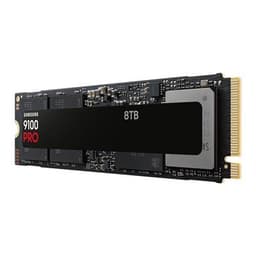
    Samsung SSD 9100 Pro M.2 PCIe 8TB
    Samsung SSD 9100 Pro M.2 PCIe 8TB

Video editing is one of the few home PC jobs where SSD choice really matters. Projects, proxy files, render caches and source footage all eat space quickly, and you'll write far more data than a gaming PC does. We've chosen these drives on the makers' own specifications for capacity, endurance and rated speed. Rated speeds are maximums that real editing workloads won't always reach.

What matters for video editing

  • Capacity first. Footage, proxies and caches fill drives quickly, so we've focused on 4TB and 8TB models for a dedicated media drive.

  • Endurance (TBW). Terabytes written is the warranty's write limit. Editing writes a lot (cache, proxies and renders), so a higher TBW gives more headroom. Our TLC vs QLC explainer covers why cheaper QLC drives usually have lower endurance.

  • PCIe 4.0 is plenty for most. PCIe 5.0 drives are faster on paper; see PCIe 4.0 vs PCIe 5.0 SSDs before paying extra.

  • Separate drives. A common setup is one SSD for Windows and apps, and a second large SSD for footage and cache.

Best overall: Samsung 990 PRO 4TB

Samsung lists the 990 PRO 4TB as a PCIe 4.0 x4, NVMe 2.0 M.2 2280 drive rated at up to 7,450MB/s reads and 6,900MB/s writes. Its warranty is five years or 2,400TBW, whichever comes first. That combination of a high endurance rating and top-end PCIe 4.0 speed makes it a strong media drive for a PC that doesn't have a PCIe 5.0 M.2 slot, and Samsung lists its Magician software for SSD management.

Best high-capacity PCIe 4.0: WD_BLACK SN850X 8TB

Sandisk's datasheet rates the WD_BLACK SN850X 8TB at up to 7,200MB/s reads and 6,600MB/s writes, with a 4,800TBW endurance rating, double the 990 PRO 4TB's figure. The 4TB model is rated at 2,400TBW. If you want one big internal drive for footage, the 8TB SN850X is the pick. The 4TB with heatsink suits motherboards without an M.2 cover.

Best PCIe 5.0: Samsung 9100 PRO 8TB

For a current AM5 or Intel Core Ultra build with a PCIe 5.0 M.2 slot, Samsung lists the 9100 PRO 8TB as a PCIe 5.0 x4, NVMe 2.0 drive rated at up to 14,800MB/s reads and 13,400MB/s writes. It's the fastest drive here on paper. Check our best 8TB SSD guide for other high-capacity options.

Best portable SSD for shoots: Samsung Portable SSD T9 4TB

For moving footage from a shoot to your editing PC, Samsung's datasheet rates the T9 4TB at up to 2,000MB/s reads and up to 1,950MB/s to 2,000MB/s writes depending on capacity, over USB 3.2 Gen 2x2 (20Gbps), with a five-year limited warranty. You need a 20Gbps USB port to reach those speeds. See our best external SSD guide for more choices.

Which should you buy?

  • Most editors on PCIe 4.0: Samsung 990 PRO 4TB.

  • Lots of footage in one drive: WD_BLACK SN850X 8TB.

  • New PCIe 5.0 build: Samsung 9100 PRO 8TB.

  • Footage on the move: Samsung T9 4TB.

Pair your drive with an editor from our best free video editing software guide, and if you're working with 4K or larger timelines, keep an eye on VRAM use as well as storage.

Our verdict

For most PC video editors, a 4TB PCIe 4.0 drive such as the Samsung 990 PRO is the sweet spot, with up to 7,450MB/s rated reads and a 2,400TBW endurance rating. If you need more space, the WD_BLACK SN850X 8TB doubles the endurance rating to 4,800TBW, and the Samsung 9100 PRO 8TB is the fastest choice for PCIe 5.0 builds. Keep Windows on a separate drive and leave the big SSD for footage and cache.

The bottom line

For most PC video editors, a 4TB PCIe 4.0 drive such as the Samsung 990 PRO is the sweet spot, with up to 7,450MB/s rated reads and a 2,400TBW endurance rating. If you need more space, the WD_BLACK SN850X 8TB doubles the endurance rating to 4,800TBW, and the Samsung 9100 PRO 8TB is the fastest choice for PCIe 5.0 builds. Keep Windows on a separate drive and leave the big SSD for footage and cache.

Sources

  1. 01Samsung UK, 990 PRO 4TB NVMe PCIe Gen 4 SSD (MZ-V9P4T0BW) specifications
  2. 02Samsung UK, 9100 PRO 8TB NVMe PCIe Gen 5 SSD (MZ-VAP8T0BW) specifications
  3. 03Sandisk, WD_BLACK SN850X NVMe SSD data sheet
  4. 04Samsung Semiconductor, Samsung Portable SSD T9 Data Sheet (Rev 1.0)

About the author

Hannah Vance

Buying Guides & Peripherals Editor

Hannah edits Forge PC's buying guides and component roundups across gaming monitors, mechanical keyboards, mice, cases and power supplies. She specialises in OLED and Mini-LED panel characteristics, low-latency wireless peripherals, acoustic damping and value-for-money component selection for UK PC builders.

More from Hannah Vance

Read next

Samsung 990 PRO vs WD_BLACK SN850X: Which PCIe 4.0 SSD Should You Buy?

Versus

Samsung 990 PRO vs WD_BLACK SN850X: Which PCIe 4.0 SSD Should You Buy?

Samsung 990 PRO vs WD_BLACK SN850X at 2TB on maker specs: 7,450/6,900MB/s against 7,300/6,600MB/s, both 1,200TBW with five-year warranties. The 990 PRO has slightly higher rated speeds; the SN850X offers an 8TB model and Sandisk Dashboard's Game Mode 2.0.

Callum Reid2 min

Samsung T7 Shield vs T9: Which Portable SSD Should You Buy?

Versus

Samsung T7 Shield vs T9: Which Portable SSD Should You Buy?

Samsung T7 Shield vs T9 compared on Samsung's datasheets: USB 3.2 Gen 2 (10Gbps) vs Gen 2x2 (20Gbps), up to 1,050MB/s vs 2,000MB/s, IP65 on the T7 Shield only, 98g vs 122g, three-year vs five-year warranty and which to buy.

Callum Reid2 min

How to Use Samsung Magician to Check and Update Your SSD

How-To

How to Use Samsung Magician to Check and Update Your SSD

How to use Samsung Magician 9 with a Samsung SSD: supported operating systems, Diagnostic Scan for drive health, backing up before firmware updates, Performance Benchmark, Over Provisioning, Data Migration, Secure Erase and why drives show less capacity.

Marcus Thorne3 min