Most motherboards have only a handful of fan headers, and it's easy to use them all up. A CPU cooler with two fans, a rear exhaust, three front intakes and a couple of top fans already add up to more headers than many boards provide. There are two common ways to run several fans from one header: a splitter cable (often called a Y-cable) or a fan hub. They look as if they do the same job, but the way they deliver power is different, and that difference decides which one is right for your build.
This guide is based on manufacturer documentation read on 24 November 2026: Noctua's product pages and support FAQs, ARCTIC's Case Fan Hub and P12 PWM PST pages, and the fan-header table in ASUS's PRIME Z790-A WIFI motherboard manual. There are no invented noise or temperature figures here.
The short answer
Use a splitter for two or three ordinary fans on one header, as long as their combined current stays under the header's limit.
Use a SATA-powered hub for four or more fans, for higher-current fans, or whenever you're not sure your header can cope, because the fans then draw their power from the PSU instead of the motherboard.
Every fan header has a maximum current it can safely supply. Noctua's support FAQ says most motherboard fan headers support up to 1A, and that the figure is usually listed in the motherboard manual. As an example, ASUS's manual for the PRIME Z790-A WIFI lists 1A and 12W for every fan header on the board, including CPU_FAN, CPU_OPT, the four CHA_FAN headers and AIO_PUMP.
To see whether a group of fans is safe on one header, Noctua's method is simple: look up each fan's maximum input current on its specification sheet, add them together, and make sure the total stays below the header's rating. Noctua's own worked example uses three NF-A12x25 PWM fans, each rated at up to 0.14A, for a total of 0.42A, which is well within a 1A header.
You can do the same with any fan. ARCTIC lists the Arctic P12 PWM PST at 0.1A at 12V, for example, so on paper several of them fit comfortably under a 1A limit. Fans with very high maximum speeds can draw far more: Noctua names the NF-A14 industrialPPC-3000 PWM as its highest-current fan at 0.55A, so just two of those would already be over 1A.
How a fan splitter works
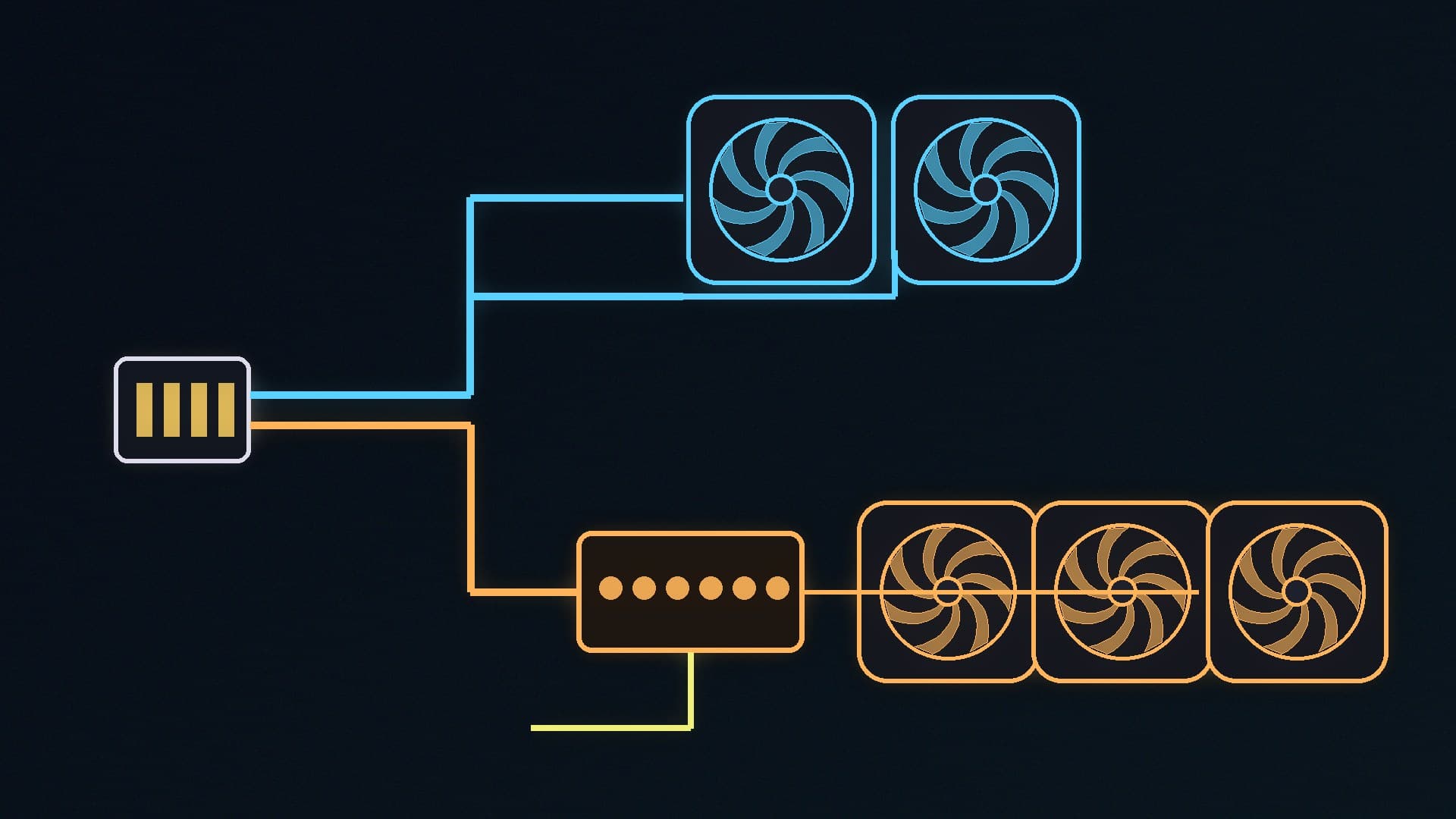
A splitter is a passive cable. It takes one 4-pin header and branches it into two or more fan connectors. Power and the PWM speed signal come from that one header, so every fan on the splitter gets the same speed signal and every fan's power comes out of the header's current budget. Noctua describes its Y-cables as letting the motherboard control the speed of both fans simultaneously.
Noctua sells two kinds. The NA-SYC1 is a set of two 2-way Y-cables (NA-YC1), and Noctua says several can be daisy-chained to control more than two PWM fans from one header. The NA-SC1 Sx2 is a set of two 3-way splitters: one powers three fans, and connecting the second to the first lets you run five fans from one header. Both work with 4-pin PWM fans and 3-pin fans; Noctua notes that 3-pin fans are speed-controlled by voltage rather than PWM.
Two things to know before you buy:
Only one fan reports its speed. Noctua says the NA-SC1 feeds the RPM signal of the fan on the first output connector back to the motherboard, so your BIOS or fan software sees that one fan's speed for the whole group. That's normal and doesn't mean the other fans have stopped.
Daisy-chaining doesn't add power. Every extra splitter adds fans to the same header, so the current sum still has to fit within its limit. Noctua's product pages carry the same warning: make sure the combined power draw stays within the limit in your motherboard manual.
Some fans build the splitter in. ARCTIC's P12 PWM PST has a 4-pin connector plus a 4-pin socket, so you can chain fans together without a separate cable. The same current rule applies.
How a fan hub works
A hub is a small board with several fan ports and its own power input. The usual design takes a 4-pin cable from one motherboard header for the speed signal and a SATA power cable from the power supply for the fans' power. That's the key difference from a splitter: the motherboard still controls fan speed, but the fans no longer draw their power through the header.
Noctua NA-FH1. This hub has eight fan ports and supports 4-pin PWM and 3-pin fans. Noctua says it can supply up to 54W when powered through SATA (for 12V fans only) or up to 24W through its 4-pin input alone, and both inputs have a self-resetting fuse. The two inputs can be used together, in which case the hub takes power from SATA and passes PWM and RPM signals over the 4-pin cable. It reports the RPM of the fan on port 1 to the motherboard, has a status LED for each port that goes out if a fan stops, and attaches with magnets. Noctua gives it a 6-year warranty.
Noctua's FAQ makes an important point about running the NA-FH1 without SATA power. On the 4-pin input alone the hub can deliver up to 2A, but if the motherboard header is rated at only 1A, the hub is effectively limited to 1A too. With SATA power connected, the total rises to 4.5A. Noctua's two examples show the difference: seven NF-A12x25 PWM fans on a 1A header without SATA power, or eight of the high-current NF-A14 industrialPPC-3000 PWM fans with SATA power and headroom to spare.
ARCTIC Case Fan Hub. ARCTIC's hub has ten 4-pin PWM outputs, each listed at 1A, and takes its input from SATA power (up to 4.5A) plus one 4-pin fan header. ARCTIC says the PWM signal is passed to all connected fans together, the speed of the fan in the first slot is reported to the system, and the fans are powered directly from the power supply through the SATA connection. It comes with adhesive pads and magnetic strips for mounting, measures 86.3 x 55.6 x 14.3mm and has a 6-year warranty.
Fan hub vs splitter at a glance
| Splitter cable | SATA-powered fan hub |
|---|
Where fan power comes from | The motherboard header | The PSU via SATA (signal from the header) |
Typical fan count | 2-3 per cable (more if chained) | 8 (Noctua NA-FH1) or 10 (ARCTIC Case Fan Hub) |
Limit to watch | The header's rating (often 1A) | The hub's total and per-port ratings |
Speed control | All fans follow one header | All fans follow one header |
RPM reporting | First fan only | First port only |
Extra cables | None | One SATA power lead |
Mounting | Hidden in the cable run | Needs a spot in the case (magnets or tape) |
Which should you choose?
Choose a splitter if you're adding one or two fans to a header that already has one, the fans are ordinary low-current models and you've checked the total against your manual. It's the tidiest option: no extra box to mount and no extra power lead. A pair of front intakes or the two fans on a tower cooler is a typical use.
Choose a hub if you want to run four or more fans from one header, you're using high-speed or high-current fans, or your motherboard manual gives a low or unclear header rating. Because the fans draw power from the PSU, the header only has to carry the control signal, which takes the guesswork out of the current sum. A hub also keeps a case full of fans to a single cable run back to the motherboard.
Whichever you use, remember that all the fans on one header run on the same speed curve. If you want your intakes and exhausts to behave differently, put them on separate headers. Our guide to setting fan curves explains how to tune each header, and our PWM vs DC fans explainer covers the difference between 4-pin and 3-pin control.
Avoid these mistakes
Don't guess the header rating. Look it up in your manual. The 1A figure is common, not universal.
Think about monitoring before you split the CPU fan header. With a hub or splitter, the board sees the speed of only the first fan, so if that fan is unplugged or stops, the header reports no speed. If you get a fan warning at boot, our guide to fixing a CPU fan error covers the usual causes.
Don't use a SATA-powered hub with 5V fans. Noctua says the NA-FH1's SATA input is for 12V fans only; 5V fans can run only from its 4-pin input.
Don't mount a magnetic hub on a hard drive. Noctua specifically warns against placing the NA-FH1 directly on HDDs.
If you're still choosing fans, our best ARCTIC case fans guide and our walkthrough on installing case fans are good next steps.
Our verdict
For two or three ordinary fans, a splitter is the simplest answer, provided their combined current stays under the header's limit, which Noctua says is up to 1A on most motherboards. If you're running more fans, using high-current fans or don't know your header's rating, a SATA-powered hub is the safer choice: the motherboard still sets the speed, but the power comes from the PSU. Either way, all the fans on one header share a single speed curve and only the first fan reports its RPM.