HP now sells a broad range of ready-made local AI machines. Its Z line now includes a palm-sized NVIDIA GB10 box, a mini workstation and a 14-inch laptop that both use AMD's Ryzen AI Max PRO chips with up to 128GB of unified memory, and much bigger systems above them. If your business would rather buy a supported workstation than build a PC, which HP should you choose?
The specifications below come from HP's UK product pages, read on 27 November 2026. Prices vary by configuration, so we haven't listed them; check the exact specification before you buy, because HP says memory on the AMD models, and storage on the ZGX Nano, must be chosen at purchase.
Our picks at a glance
| HP ZGX Nano AI Station | HP Z2 Mini G1a | HP ZBook Ultra G1a 14" |
|---|
Type | Mini AI station | Mini workstation | Laptop |
Processor | NVIDIA GB10 Grace Blackwell Superchip (20-core Arm CPU) | Up to AMD Ryzen AI Max+ PRO 395 | Up to AMD Ryzen AI Max+ PRO 395 (16 CPU cores, 40-core GPU) |
Memory | 128GB coherent unified memory | Up to 128GB unified memory, up to 96GB assignable to the GPU | Up to 128GB unified memory, up to 96GB assignable to the GPU |
HP's AI claim | Up to 1,000 TOPS; models up to 200B parameters | Up to 50 NPU TOPS | Up to 50 NPU TOPS |
Storage | 2TB or 4TB self-encrypting NVMe | Up to 8TB (dual NVMe, RAID) | Up to 4TB |
Best for | AI development, largest models | Windows or Linux desk AI box | Local AI on the move |
Best for local AI development: HP ZGX Nano AI Station
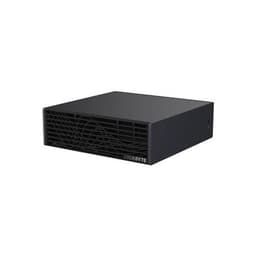
The ZGX Nano is HP's version of the NVIDIA GB10 mini PC format. HP's page lists the NVIDIA GB10 Grace Blackwell Superchip with a 20-core Grace Arm CPU and up to 1,000 TOPS of AI compute from the Blackwell GPU, plus 128GB of coherent unified system memory. HP says that lets you prototype, fine-tune and run inference on models of up to 200 billion parameters at your desk, and that two ZGX Nano systems connected together can work with models of up to 405 billion parameters (the QSFP cable is sold separately). HP also lists NVIDIA ConnectX networking with two QSFP ports at a 200Gbps signalling rate.
It's tiny: HP gives the size as 150mm x 150mm x 51mm, excluding feet. Storage is 2TB or 4TB of self-encrypting NVMe on the product page, chosen when you buy, while HP's workstation range page lists 1TB and 4TB models, so check what's offered in your region.
HP's selling point over other GB10 boxes is its software. The free HP Z Toolkit is a Visual Studio Code extension that discovers and pairs with the ZGX Nano and installs open-source tools, MLflow and Ollama. HP notes that the client PC running the toolkit must be x86-based, with Windows 11 or Ubuntu 24.04 or later. It's built around an Arm CPU and NVIDIA's AI software stack, and HP pitches it at building, fine-tuning and validating models, so it suits developers and data scientists more than people who want an everyday desktop. Our DGX Spark vs Ryzen AI Max+ 395 comparison explains that trade-off in more detail, and other GB10 systems in our database include the Gigabyte AI TOP Atom.
Choose the ZGX Nano if you develop, fine-tune or test large models and want a dedicated AI box.
Best Windows AI desktop: HP Z2 Mini G1a
The Z2 Mini G1a is the pick if you want a small x86 workstation that runs Windows 11 Pro, WSL2 or Linux. HP offers it with up to an AMD Ryzen AI Max+ PRO 395 and up to 128GB of unified memory, with up to 96GB assignable exclusively to the integrated Radeon GPU and data rates up to 8,000 MT/s. HP's own page pitches it for running LLM software on a mini workstation with fewer memory bottlenecks.
That memory pool is the reason to buy it for local AI. A discrete graphics card has a fixed amount of VRAM; here you choose how much of the system memory the GPU gets, as explained in our guide to setting AMD Variable Graphics Memory and our unified memory vs VRAM explainer. Memory has to be configured at purchase, so if large models are the goal, order the 128GB option.
The rest of the specification is workstation-grade: up to 8TB with dual NVMe modules and RAID, a 50 TOPS NPU, USB4 40Gbps/Thunderbolt 4, 2.5GbE, Wi-Fi 7, support for up to four 4K displays and two Flex IO slots for extra ports. HP also says five Z2 Minis fit in 4U of rack space without external power bricks, which is handy for small offices that want several AI boxes.
Choose the Z2 Mini G1a if you want a compact Windows or Linux machine that can hold larger models than most graphics cards.
Best AI laptop: HP ZBook Ultra G1a 14"
The ZBook Ultra G1a puts the same Ryzen AI Max PRO platform into a 14-inch mobile workstation. HP lists up to the Ryzen AI Max+ PRO 395 with 16 CPU cores and a 40-core GPU, up to 128GB of unified memory with up to 96GB assignable to the GPU, up to 4TB of storage and a 50 TOPS NPU.
Unusually, HP publishes an LLM recommended configuration matrix for this laptop. It maps popular open models to suggested configurations: for Llama 3.3 70B it recommends the Ryzen AI Max+ PRO 395 with 128GB of memory and 75% allocated to the GPU, while Llama 3.2 1B is listed with the Ryzen AI Max+ PRO 385 or greater and 32GB or more. That's a useful sanity check whichever Ryzen AI Max machine you're considering, alongside our explainer on context length and VRAM.
Choose the ZBook Ultra G1a if you need to run sizeable models away from your desk. For other options, see our pick of the best laptops for local AI.
Bigger options
HP's workstation range page also lists two larger AI products, though we haven't covered them in detail here. The HP ZGX Fury AI Station is described as hosting models of up to 1 trillion parameters locally for shared, on-premises AI. The HP ZBook Ultra G3a 16-inch mobile workstation is listed with up to 160GB of dedicated graphics memory for running large AI models locally. Check HP's product pages for full specifications and availability before shortlisting either.
If you'd rather put professional graphics cards in a tower, our guide to the best workstation GPUs for AI covers the cards themselves, and our best mini PCs for local AI round-up compares HP's rivals.
What to check before you buy
Memory is fixed at purchase. HP says memory on the Z2 Mini G1a and ZBook Ultra G1a must be configured when ordering, and the ZGX Nano comes with 128GB. For local LLMs, buy the most you can justify.
Arm or x86. The ZGX Nano uses an Arm CPU and NVIDIA's AI software stack; the Z2 Mini G1a and ZBook Ultra G1a are x86 machines, and HP lists Windows 11 Pro, WSL2 or Linux for the Z2 Mini G1a.
Bandwidth matters as much as capacity. Unified memory lets you load big models, but token generation speed is usually limited by memory bandwidth, as we explain in memory bandwidth and local LLM speed.
HP's claims are maximums. Parameter counts and TOPS figures are HP's own and depend on model format, precision and software.
Our verdict
The HP ZGX Nano AI Station is the best HP workstation for local AI development, thanks to its NVIDIA GB10 chip, 128GB of unified memory and HP's claim of handling models of up to 200 billion parameters. Choose the Z2 Mini G1a if you want a compact Windows or Linux desk machine with up to 96GB of memory for the GPU, and the ZBook Ultra G1a 14" if you need the same capacity in a laptop.