If your desktop's motherboard doesn't have built-in Wi-Fi, it almost certainly doesn't have Bluetooth either, which means no wireless headphones, no Bluetooth controller and no pairing your phone. A small USB Bluetooth adapter is the cheapest fix. Our picks are based on TP-Link's and ASUS's official UK product and specification pages, linked in the sources.
We haven't included prices because small accessories are being discounted and re-priced daily in the run-up to Black Friday (Friday 27 November 2026). Our guide on how to check Black Friday PC deals explains how to tell a real discount from a fake one.
Our picks at a glance
| Best overall | Best for range | Best for Linux |
|---|
Model | TP-Link UB5A | TP-Link UB500 Plus | ASUS USB-BT500 |
Bluetooth version | 5.3 | 5.3 | 5.0 |
Interface | USB 2.0 | USB 2.0 | USB 2.0 Type-A |
Antenna | Internal (nano) | External, adjustable | Internal (nano) |
Size | 14.8 x 6.8 x 18.9mm | 81 x 42 x 16.8mm | 7.1 x 14.9 x 17.4mm |
Operating systems listed | Windows 11/10/8.1/7 | Windows 11/10/8.1/7 | Windows 8.1/10, Linux |
Figures are from the manufacturers' UK product and specification pages. The ASUS page lists Windows 8.1, Windows 10 and Linux; it doesn't list Windows 11, so check the ASUS support page for current drivers before you buy if you're on Windows 11.
Before you buy: do you already have Bluetooth?
Check before you spend anything. Open Settings > Bluetooth & devices in Windows 11; if there's a Bluetooth toggle, your PC already has it. If the toggle has vanished or Bluetooth stopped working after an update, our guide on how to fix Bluetooth not working in Windows 11 is the place to start.
If you also need Wi-Fi, a USB dongle isn't the best answer. Many PCIe Wi-Fi cards include Bluetooth too, such as TP-Link's Archer TBE550E, which Forge PC's specs database lists with Bluetooth 5.4. Our best Wi-Fi 7 PCIe card guide covers those.
1. TP-Link UB5A: best overall
TP-Link's UB5A is a nano adapter, small enough to leave in a USB port permanently, with Bluetooth 5.3. TP-Link's specification lists a USB 2.0 interface (plenty for Bluetooth) and dimensions of 14.8 x 6.8 x 18.9mm, and says it supports up to seven Bluetooth devices at once. Its datasheet says it's backward compatible with Bluetooth 5.2, 5.0 and 4.0 devices, supports Bluetooth Low Energy and quotes a transmission distance of up to 20m in open space.
TP-Link lists support for Windows 11, 10, 8.1 and 7, with a separate driver download needed for Windows 7. Be aware that speed, range and device-count figures are TP-Link's own lab numbers; TP-Link itself notes real-world performance may vary.
Choose it if: you want a tiny, current Bluetooth 5.3 adapter for a headset, controller, keyboard or mouse and your PC sits near your desk.
2. TP-Link UB500 Plus: best for range
The catch with a nano adapter in the back of a tower is that the case, the desk and you are all in the way. TP-Link's UB500 Plus tackles that with a rotating, multi-directional external antenna that TP-Link says can be adjusted to improve performance in different environments. It's Bluetooth 5.3 over USB 2.0 and, like the UB5A, supports up to seven devices and Windows 11, 10, 8.1 and 7.
It's much bigger than a nano dongle at 81 x 42 x 16.8mm, so it's not one to leave in a laptop. TP-Link's UK page doesn't quote a range figure for the UB500 Plus, so we can't say how much further it reaches than the UB5A; the advantage is being able to angle the antenna rather than relying on a chip buried behind a steel case.
Choose it if: your PC is under the desk or across the room from your headphones or controller, and a nano adapter keeps dropping out.
3. ASUS USB-BT500: best for Linux
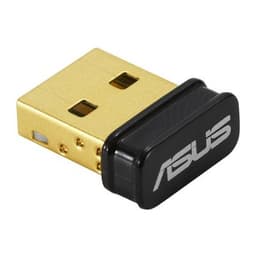
ASUS's USB-BT500 is an older Bluetooth 5.0 nano adapter, but it stands out for listing Linux alongside Windows 8.1 and 10 on its official specification page. ASUS quotes data rates of up to 3Mbps for classic Bluetooth (BR/EDR) and 2Mbps for Bluetooth Low Energy, with a range of up to 10m for classic Bluetooth and up to 40m for Low Energy in open space. It weighs 1.9g.
Bluetooth 5.0 is older than the 5.3 in the TP-Link models, and ASUS doesn't list Windows 11 on the specification page. For a Windows 11 desktop we'd start with the UB5A.
Choose it if: you run Linux or dual-boot and want an adapter whose maker lists Linux support.
How to choose
Bluetooth version matters less than you think. Newer versions bring reliability and security improvements, as TP-Link says of Bluetooth 5.3, but your headphones or controller also set the limits. A 5.3 adapter won't make an old headset behave like a new one.
Placement matters too. If you get dropouts with an adapter in a rear port, a front USB port or a short USB extension cable may help by getting it out from behind the case.
Bluetooth isn't the only wireless option for gaming. Many gaming mice and headsets come with their own 2.4GHz receiver. Our Bluetooth vs 2.4GHz wireless comparison explains the trade-offs.
Check driver support for your OS. All three work as plug-in adapters, but the listed operating systems differ, so check the support pages if you're on Windows 7 or Linux.
Our verdict
For most Windows 11 desktops, TP-Link's UB5A is the one to buy: a tiny Bluetooth 5.3 nano adapter that supports up to seven devices. If your PC is under the desk and you get dropouts, the UB500 Plus's adjustable external antenna is the better choice. Linux users should look at ASUS's older USB-BT500, the only one of the three whose official spec page lists Linux. And if you need Wi-Fi as well, skip the dongle and buy a PCIe Wi-Fi card that includes Bluetooth.