This story is based on a leaked roadmap slide shared by the hardware leaker HXL and reported by Wccftech on 3 November 2026. Microsoft hasn't published or confirmed the roadmap, so treat the details as unofficial.
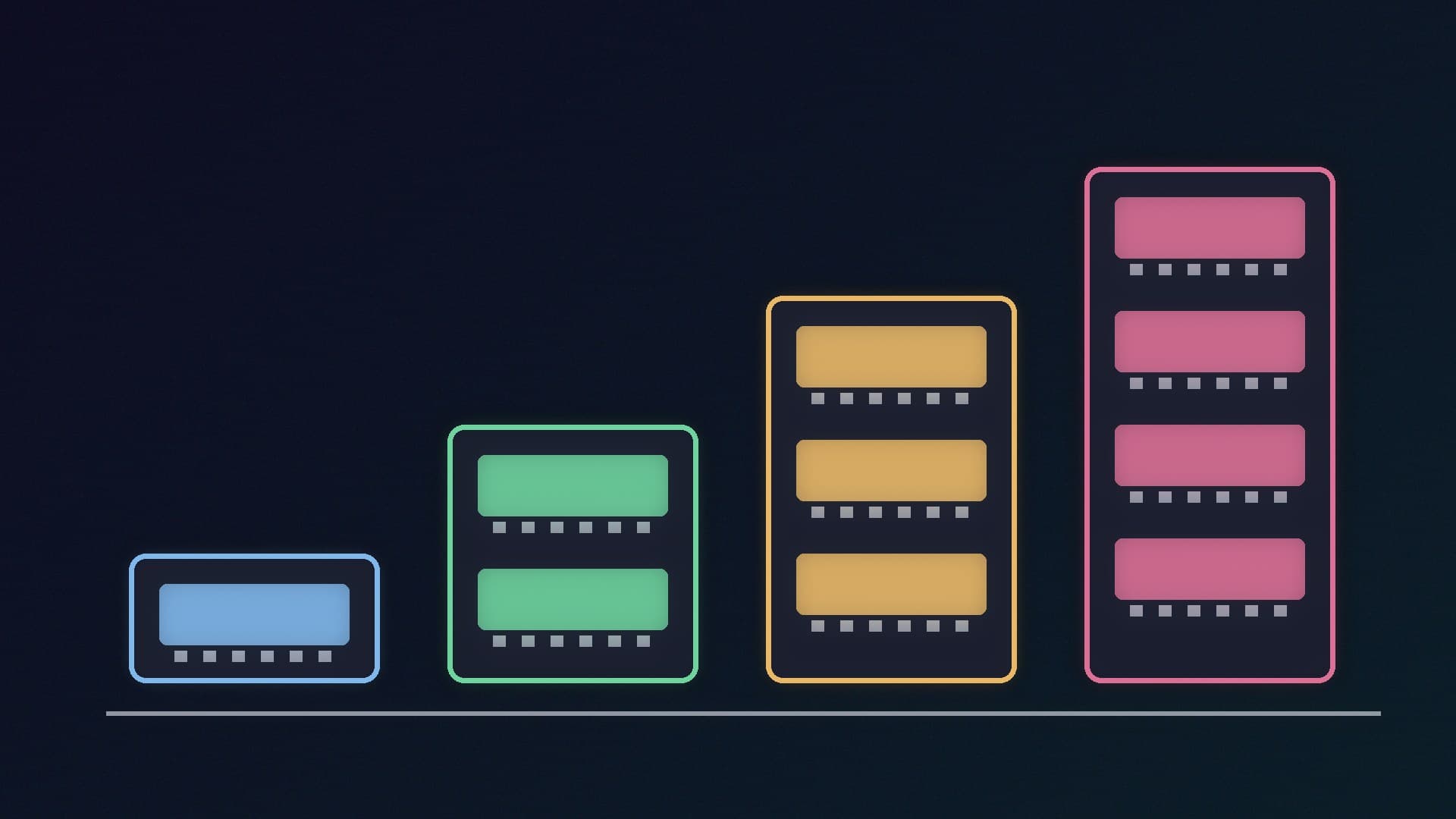
According to the report, Microsoft has laid out a four-tier plan for Windows AI PCs, and the dividing line between tiers is mostly system memory rather than processor brand or NPU speed. That matches what anyone running local AI has learned the hard way: memory decides what you can actually run.
The four tiers, as reported
Tier 0: 8GB entry machines
The entry tier reportedly starts at 8GB of memory and covers basic local AI tasks that Wccftech describes as local context and actions. The chips listed include Intel Core Series 3 "Wildcat Lake" and its refresh, AMD Ryzen 100 and 200 series, and Qualcomm's Snapdragon C, Snapdragon X and Snapdragon X Plus.
Tier 1: 16GB to 64GB Copilot+ PCs
Tier 1 reportedly covers the mainstream, from 16GB up to 64GB, and is described as Copilot+ compliant, with local questions, delegated tasks and long-running tasks handled on the device. Listed chips include Intel Core Ultra Series 3 "Panther Lake", AMD Ryzen AI 400 "Gorgon Point" and Snapdragon X2 Plus and X2 Elite, with future Intel Core Ultra Series 4 "Nova Lake" and AMD Ryzen AI 500 "Medusa Point" also named. At the premium end of this tier, the report lists AMD Ryzen AI Max+ 400 "Gorgon Halo", NVIDIA RTX Spark "N1X" and an unnamed Intel Core Ultra Next part.
Tier 2: 128GB+ builder PCs
Tier 2 reportedly starts at 128GB of memory and is aimed at people who build and serve models locally. AMD Ryzen AI Max+ 400 and NVIDIA RTX Spark are listed as available today, with Intel Core Ultra Next and a future Snapdragon part to follow. Our RTX Spark vs Ryzen AI Max+ 395 comparison covers the current machines in this class.
Tier 3: personal AI supercomputers
The top tier is described as workstation-class hardware for running frontier models locally, with examples including Intel's upcoming Crescent Island GPUs, NVIDIA's GB300 in the DGX Station and an AMD "Threadripper Halo Station".
How this fits with Copilot+ today
Microsoft's current public guidance for Copilot+ PCs centres on the NPU: its developer documentation says many of the new Windows AI features need an NPU that can run at more than 40 TOPS. The leaked roadmap doesn't replace that requirement, but it puts memory alongside it as the main way to describe what a PC can do with AI. If you want to know what Copilot+ actually adds, see our Copilot+ PC vs regular Windows 11 PC comparison, and for how TOPS figures compare with GPU numbers, our TOPS vs TFLOPS explainer.
What it means if you're buying a PC
Even as a leak, the tiers line up with practical advice:
8GB is the bare minimum. Wccftech notes 8GB is already tight for everyday multitasking, and it leaves little room for local models.
16GB is the realistic floor for an AI PC, and the start of the Copilot+ tier in this roadmap. If you plan to run local language models, 32GB or more gives far more headroom. Our guide to how much RAM you need for local AI goes into detail.
128GB of unified memory is now a product category, not a niche. Machines built on Ryzen AI Max+ and RTX Spark are being positioned for people who want to run and serve large models locally.
Many laptops and mini PCs use soldered memory. You can't upgrade it later, so pick the tier you need when you buy.
If you're unsure whether your current PC is up to the job, our guide on how to check if your PC can run a local LLM is a quick place to start.
Our verdict
This is an unconfirmed leak, so don't plan a purchase around the exact chip lists. The underlying message is still sensible: in Microsoft's reported view, memory capacity is what separates a basic AI PC from one that can run serious local models. If you're buying a laptop or mini PC with soldered memory, 16GB is the minimum we'd consider for AI features, and 32GB or more is worth it if you want to run models locally.