PrismML's Ternary Bonsai 2.5 27B squeezes Alibaba's Qwen3.8 27B into a 5.93GB file by storing every weight as -1, 0 or +1. That's small enough to fit entirely in the VRAM of many mainstream graphics cards. The catch is that its smallest files need PrismML's own build of llama.cpp. This guide explains which file to download, which llama.cpp to use and how to start it on Windows or Linux. Everything below comes from PrismML's Hugging Face model card and its Bonsai-demo GitHub repository, read on 27 November 2026, and all benchmark and speed figures are PrismML's.
What Ternary Bonsai 2.5 27B is
According to PrismML's model card:
It's based on Qwen3.8-27B, a 27B hybrid-attention model, and keeps that architecture.
The weights are ternary: each takes a value of -1, 0 or +1, with one shared FP16 scale for every group of 128 weights. That works out at 1.76 bits per weight, giving a 5.93GB file against 53.8GB for the FP16 model.
Version 2.5 targets agentic and tool-calling work. PrismML says SWE-bench Verified rose from 60.8 for Bonsai 2 to 75.6, against 80.6 for full-precision Qwen3.8 27B on its figures.
The context window is 262K tokens, it's a reasoning model that thinks by default, and it accepts images through an optional vision file.
It's released under the Apache 2.0 licence.
We haven't seen independent tests of these figures yet. If you're new to quantisation, our GGUF quantisation explainer covers the basics.
Step 1: Pick the right file
PrismML publishes three "packings" of the same ternary model. They behave the same but need different software:
File | Size on Hugging Face | Runs on | Best for |
|---|
PTQ1_0 | 5.99GB | PrismML llama.cpp fork only | NVIDIA GPUs (PrismML says it decodes fastest on every NVIDIA GPU it measured) |
PQ2_0 | 7.25GB | PrismML llama.cpp fork only | Apple Silicon (the format PrismML benchmarked on Metal) |
Q2_0 | 7.67GB | Stock llama.cpp b11556 or newer | Apps and setups that use the official llama.cpp |
The sizes are from PrismML's repository file list. Each file also comes in an -mtp version (about 240MB larger) with a built-in draft head for faster decoding. The mmproj file (629MB at Q8_0) is needed only for image input.
The important warning: stock llama.cpp rejects PTQ1_0 and PQ2_0 as unknown types. Worse, PrismML says stock llama.cpp builds older than b11556 "load Q2_0 without any warning and produce garbage". Check your version with llama-cli --version before blaming the model. PrismML adds that apps which bundle their own copy of llama.cpp need an engine built from b11556 or newer.
Step 2 (easiest): Use PrismML's Bonsai-demo scripts
PrismML calls its Bonsai-demo repository "the source of truth for running these models". Its setup script downloads the right llama.cpp binaries and model files for your machine.
On Windows (PowerShell):
git clone https://github.com/PrismML-Eng/Bonsai-demo.git
cd Bonsai-demo
Set-ExecutionPolicy -Scope Process -ExecutionPolicy Bypass
.\setup.ps1
.\scripts\start_llama_server.ps1
On Linux or macOS:
git clone https://github.com/PrismML-Eng/Bonsai-demo.git
cd Bonsai-demo
./setup.sh
./scripts/start_llama_server.sh
Then open http://localhost:8080 in your browser. The demo's README says setup downloads about 6.4GB of model files in the PTQ1_0 packing on CUDA-class GPUs, or about 7.6GB in PQ2_0 on other backends. It also installs Open WebUI and a code interpreter, which add a few GB and most of the wait. To skip those, set BONSAI_OPENWEBUI=0 and BONSAI_CODE_INTERPRETER=0 before running setup.
You'll need Git installed first. On Windows, winget install Git.Git will do it.
Step 2 (manual): Run it with the PrismML llama.cpp fork
If you'd rather run llama.cpp yourself, PrismML's fork publishes prebuilt releases. The latest when we checked, prism-b12232, includes Windows builds for CUDA 12.4 and 13.3, Vulkan, HIP (Radeon), SYCL and CPU, plus Linux builds for CUDA, ROCm, Vulkan and SYCL. The release also includes separate cudart zips for CUDA 12.4 and 13.3. Our llama.cpp on Windows guide explains how to pair a CUDA build with its runtime files.
Download the model with the Hugging Face CLI:
hf download prism-ml/Ternary-Bonsai-2.5-27B-gguf Ternary-Bonsai-2.5-27B-PTQ1_0.gguf --local-dir .
Then run it with PrismML's recommended settings:
llama-cli -m Ternary-Bonsai-2.5-27B-PTQ1_0.gguf -ngl 99 -fa on -c 32768 --temp 1.0 --top-p 0.95 --top-k 20 --min-p 0 -n 16384
What the flags do, according to the model card:
-ngl 99 puts every layer on the GPU (0 runs on the CPU only).
-c 32768 sets the context. You can go up to 262144 if you have the memory for it.
--min-p 0 matters, because llama.cpp defaults to 0.05 and PrismML's settings assume 0.
-n 16384 leaves room for the model's thinking. It reasons at xhigh effort by default, so a small limit such as 256 tokens can cut it off mid-thought before it answers.
If you're new to llama.cpp, the same guide covers the basics of the command line and server.
Using stock llama.cpp instead
If you already have official llama.cpp b11556 or newer, download the Q2_0 file and use the same flags. PrismML says that on an H200, stock llama.cpp gives output matching its own runtime on the Q2_0 file, but decodes at 109 tokens per second against 150 on PrismML's runtime. The fork is therefore still the faster option, at least on that data-centre GPU.
Step 3: Keep VRAM in check on smaller cards
The model card's known-issues section warns that llama-server can start in automatic mode with four request slots sharing a single KV cache, which uses more VRAM. If only you are using it, add -np 1 to your llama-server command. PrismML cites a community report from an RTX 3080 10GB owner: about 9.5GB of total GPU memory in use before adding -np 1, and about 7.8GB afterwards, including what the desktop was using. That's one user's report at their settings, not a guarantee, and a longer context will use more.
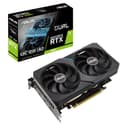
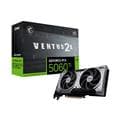
On that basis, a 12GB card such as the ASUS RTX 3060 12GB Dual Gaming OC V2 or a 16GB card such as the MSI RTX 5060 Ti 16GB Ventus 2X OC Plus leaves room for a longer context than an 8GB card. If you're stuck on 8GB, our guide to running local LLMs on 8GB of VRAM has more tips.
Step 4: Turn on MTP for faster replies
The -mtp files include a multi-token prediction draft head that guesses upcoming tokens, which the main model then checks. PrismML says the Bonsai-demo server turns this on by default where it helps, and that output matches plain decoding. PrismML's figures for NVIDIA GPUs are 1.5 to 1.8 times faster decoding, though it also says the extra pass slows prompt processing by 9 to 23%. For the general idea, see our explainer on speculative decoding in LM Studio.
PrismML's own decode figures with MTP include about 312 tokens per second on an RTX 5090, such as the NVIDIA GeForce RTX 5090 Founders Edition, and 204 on an RTX 4090. These are vendor measurements at batch size one and aren't independent. Expect lower figures on mid-range cards.
Step 5: Recommended settings and reasoning effort
PrismML recommends these sampling settings:
Thinking mode: temperature 1.0, top-p 0.95, top-k 20, min-p 0
Non-thinking (instruct) mode: temperature 0.7, top-p 0.80, top-k 20, min-p 0, presence penalty 1.5
Reasoning effort defaults to xhigh, the most accurate setting. medium gives shorter answers and balances speed against accuracy. The card warns that low isn't supported, and that selecting it makes the model "behave close to xhigh".
Using it as a coding agent
Because llama-server exposes an OpenAI-compatible API, you can point coding tools at it once it's running. Our guides to OpenCode and Ollama in VS Code cover the general setup. Swap in the llama-server address and model name in place of Ollama's. For alternatives, see our best local coding models roundup, and our Qwen 3.8 guide if you have the VRAM for a conventional quantisation of the base model.