Wireless gaming mice no longer ask you to accept lag or a heavy battery for the freedom of no cable. The question now is which kind of wireless mouse suits you: an ultralight esports shape, a versatile all-rounder you can also use with a laptop over Bluetooth, or a cheap mouse that runs for months on one AA battery. The picks below are based on each maker's published specifications, linked in the sources, and the weights, battery figures and polling rates quoted are the manufacturers' own claims rather than our measurements.
If you're still deciding whether to cut the cord at all, read our wired vs wireless gaming mouse guide first. For wired options and our overall favourites, see the best gaming mouse and best budget gaming mouse guides.
Our picks at a glance
Pick | Best for | Weight (maker's figure) | Connection | Battery (maker's figure) |
|---|
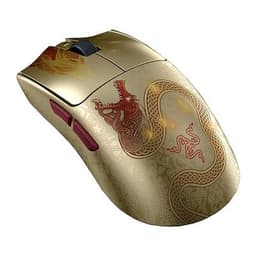
Razer Viper V3 Pro | Competitive FPS | 54 g (55 g white) | HyperSpeed wireless, up to 8000 Hz with the HyperPolling dongle | Up to 95 hours |
Logitech G Pro X Superlight 2 | A Logitech alternative for esports | 60 g | LIGHTSPEED wireless, up to 8 kHz polling | Not stated on the page we checked |
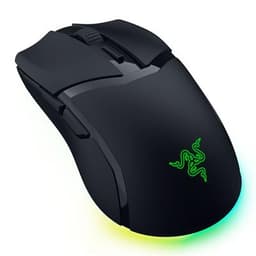
Razer Cobra HyperSpeed | All-round use, including Bluetooth | 62 g | HyperSpeed, Bluetooth or wired USB-C | Up to 110 hours (HyperSpeed), 170 hours (Bluetooth) |
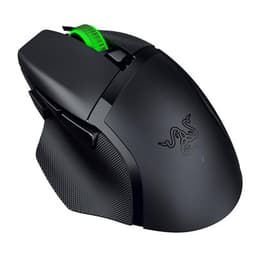
Razer Basilisk V3 X HyperSpeed | Budget, long battery life | Not stated on the page we checked | HyperSpeed or Bluetooth | One AA battery: up to 285 hours (HyperSpeed), 535 hours (Bluetooth) |
Best for competitive FPS: Razer Viper V3 Pro
The Razer Viper V3 Pro is Razer's lightweight esports mouse. Razer quotes 54 g for the black version and 55 g for the white edition, and fits its Focus Pro 35K Optical Sensor Gen-2. It's rechargeable over USB-C, with Razer claiming up to 95 hours of battery life.
The headline feature for competitive players is polling. With Razer's HyperPolling Wireless Dongle, the Viper V3 Pro can report at up to 8000 Hz. Whether you'll notice the difference depends on your monitor and your game, and 1000 Hz remains a sensible default for most people. Our guide to changing mouse polling rate explains how to set it and what to watch for.
Why pick it: the lowest claimed weight here and 8000 Hz support for esports players. Watch out for: it's built for shooters rather than button-heavy games, so look at the Basilisk below if you play MMOs or want lots of macros.
Best Logitech alternative: Logitech G Pro X Superlight 2
The Logitech G Pro X Superlight 2 is the obvious rival to the Viper. Logitech describes it as a 60 g mouse designed with professional players, using its HERO 2 sensor, which Logitech says supports up to 44K DPI, and LIGHTSPEED wireless with up to 8 kHz polling.
It's a strong choice if you already use Logitech G HUB for other peripherals, or if you prefer Logitech's shape to Razer's. As always with shape, there's no substitute for trying a mouse in a shop or checking its dimensions against one you already like.
Why pick it: a light, simple esports mouse with up to 8 kHz wireless polling from a different maker. Watch out for: Logitech's page doesn't give a battery-life figure, so we can't compare it with the Razer mice on that score.
Best all-rounder: Razer Cobra HyperSpeed
The Razer Cobra HyperSpeed is the most flexible mouse here. Razer calls it tri-mode: HyperSpeed wireless for gaming, Bluetooth for a laptop or tablet, or wired over USB-C. Razer quotes up to 110 hours on HyperSpeed and 170 hours on Bluetooth, a weight of 62 g and a Focus X 26K optical sensor. It also uses an optical scroll wheel.
Out of the box it's a standard wireless mouse, but Razer says it can be upgraded to 8000 Hz wireless polling with the Razer Mouse Dock Pro or the HyperPolling Wireless Dongle.
Why pick it: one light mouse for both a gaming PC and a laptop, with an upgrade path to 8000 Hz. Watch out for: 8000 Hz needs an extra dock or dongle, and as with any mouse, check the dimensions against one you already like.
Best budget wireless: Razer Basilisk V3 X HyperSpeed
The Razer Basilisk V3 X HyperSpeed takes a different approach. Instead of a built-in rechargeable battery it runs on a single AA battery, and Razer quotes up to 285 hours on HyperSpeed wireless and up to 535 hours on Bluetooth. It uses Razer's 5G Advanced 18K optical sensor and, according to Razer, has 7 programmable buttons and 9 programmable controls in total, which makes it a better fit than the esports mice above for games that need extra binds.
Why pick it: long battery life, Bluetooth and plenty of buttons at a lower price point. Watch out for: you'll need to swap batteries rather than plug in a cable, and Razer's page doesn't give a weight, so we can't compare it with the lighter picks here.
How to choose a wireless gaming mouse
Shape and grip first. A light mouse in the wrong shape will feel worse than a heavier one that fits. Compare the dimensions with a mouse you already like, and try one in a shop if you can.
Weight. The esports mice here weigh 54-62 g by their makers' figures. If you play slower games, weight matters much less.
Polling rate. 1000 Hz is fine for most players. 4000-8000 Hz needs supported hardware, often a separate dongle or dock, as with the Razer mice here.
Bluetooth. Useful if you also use the mouse with a laptop. For gaming, use the mouse's own 2.4GHz wireless dongle, which Razer pitches as its low-latency mode, and keep Bluetooth for battery life and convenience.
Battery type. Rechargeable mice need regular charging. The AA-powered Basilisk V3 X has a far higher claimed battery life, but you'll need spare batteries.
Dongle placement. If the cursor stutters, move the receiver closer to the mouse with a USB extension. Our wireless mouse and keyboard troubleshooting guide covers other fixes.
A good surface helps any mouse, so see our best mouse pad guide too.
Our verdict
For competitive shooters, the Razer Viper V3 Pro combines the lowest claimed weight here with 8000 Hz support, and the Logitech G Pro X Superlight 2 is the equally focused alternative if you prefer Logitech. For a mouse that does everything, including Bluetooth with a laptop, pick the Razer Cobra HyperSpeed. On a tight budget, or if you hate charging, the AA-powered Razer Basilisk V3 X HyperSpeed gives you the longest claimed battery life and the most buttons. Check the shape against your hand before you buy, because that matters more than any spec.