None of the timings in this guide are our measurements. Inference times are the example figures published in Frigate's own hardware documentation, read on 24 November 2026, and accelerator specifications come from the manufacturers' product pages. Treat the timings as a guide to hardware classes: Frigate says speeds vary greatly with the model and resolution used.
Frigate is a free, open-source network video recorder that uses AI to recognise people, vehicles and animals in your camera feeds, entirely on your own hardware. It finds motion with the CPU, then hands those regions to an object detector. Frigate's documentation says it is designed around the expectation that a dedicated detector is used, and that offloading detection to one is "an order of magnitude faster" than the CPU and cuts CPU load dramatically.
Choosing that detector is the most important hardware decision in a Frigate build, and the answer has changed. The Google Coral USB stick was the default recommendation for years, but Frigate's hardware page now says the Coral is no longer recommended for new installations. Here's what to buy, or use, instead.
Our picks at a glance
Pick | Best for | Frigate detector | Example inference time (Frigate's figures) |
|---|
Intel integrated graphics | Most homes, lowest cost | OpenVINO | ~10ms (UHD 730, MobileNetV2) |
Intel Core Ultra NPU | Efficient new mini PCs | OpenVINO | ~6ms (MobileNetV2) |
Hailo-8 / Hailo-8L M.2 | Adding an accelerator to any PC or a Raspberry Pi 5 | Hailo | ~7ms / ~11ms (YOLOv6n) |
NVIDIA graphics card | Larger, more accurate models | ONNX (TensorRT image) | 5ms (RTX 5060 Ti, YOLOv9 tiny, 320) |
AMD Radeon graphics card | AMD gaming PCs and servers | ONNX (ROCm image) | ~4ms (RX 9060 XT 16GB, YOLOv9 tiny, 320) |
Google Coral | Very low power only | EdgeTPU | n/a (no longer recommended for new builds) |
Best overall: Intel integrated graphics (OpenVINO)
For most people, the best Frigate detector costs nothing extra because it's already inside the computer. Frigate's getting-started guide says the integrated graphics on Intel CPUs provide sufficient performance for many typical setups, and the project's favourite small server is the Beelink EQ13, a mini PC built around Intel's low-power N100.
OpenVINO runs on 6th-generation Intel platforms and newer with integrated graphics, and Frigate bundles a MobileNet model that works out of the box. Frigate's published examples put MobileNetV2 inference at around 10ms on Intel UHD 730 graphics, around 15ms on UHD 770, and around 15ms on the N100 and N150. Iris Xe graphics are listed at about 10ms with MobileNetV2 and 6ms with the more accurate YOLOv9 tiny model at 320 pixels.
The one caveat is scale. Frigate notes that the N100 can only run one detector instance, and its hardware table describes the EQ13 as able to run object detection on several 1080p cameras with low to medium activity. For a bigger system, Frigate's table also lists more powerful Intel mini PCs, including one built around Intel's Core Ultra 125H, as able to handle a significant number of 1080p cameras with high activity. Our best mini PC guide covers small Intel systems.
Best for efficient new builds: Intel Core Ultra NPU
If you're buying a new mini PC, one with an Intel Core Ultra processor gives you an NPU (neural processing unit) as well as integrated graphics. Frigate lists its suggested Core Ultra 125H mini PC as including an NPU "for more efficient detection" from Frigate 0.17, and its examples put MobileNetV2 at about 6ms and YOLOv9 small at 320 pixels at 11ms on an Intel NPU.
Frigate's tip for these chips is to run object detection on the NPU and use the integrated graphics for its other AI features, such as semantic search and face recognition. Two caveats from the documentation: the NPU firmware comes from the host operating system and may need updating, and Intel NPUs can't be used under Home Assistant OS. Our explainer on NPU vs GPU for local AI covers how the two differ.
Best add-on accelerator: Hailo-8 and Hailo-8L
If your server has a spare M.2 slot but weak or no Intel graphics, a Hailo module is the add-on accelerator to look at. Frigate lists Hailo under "most hardware", supports both the Hailo-8 and Hailo-8L, and says both have been tested on x86 PCs as well as the Raspberry Pi 5. On first start, Frigate downloads a default YOLOv6n model for the module and then works offline.
Hailo rates the Hailo-8 at 26 TOPS and the Hailo-8L at 13 TOPS. The Hailo-8 M.2 module comes in M, B+M and A+E key versions, with a four-lane PCIe 3.0 interface on the M-key module, while the Hailo-8L module comes in B+M and A+E key versions with a two-lane PCIe 3.0 interface. In Frigate's own table, YOLOv6n takes about 7ms on the Hailo-8 and about 11ms on the Hailo-8L. Frigate adds that x86 systems with dual PCIe lanes gave better results than its Raspberry Pi setup.
Installing one takes a little more work than the other picks: Frigate's installation guide provides a script that builds the driver and installs the firmware, and you then pass /dev/hailo0 into the container. If you're using a Raspberry Pi 5, our guide to running a local LLM on a Raspberry Pi 5 covers Raspberry Pi's newer Hailo-10H board, a different product aimed at language models.
Best if you already have a gaming GPU: NVIDIA
An NVIDIA graphics card is the most flexible detector. Frigate says NVIDIA GPUs support the majority of model architectures through ONNX and run well "with any size models including large", which matters if you want bigger, more accurate models than the tiny ones accelerators favour. You need the stable-tensorrt image, a host driver of version 545 or newer, the NVIDIA container runtime, and a card with CUDA compute capability 5.0 or higher (roughly Maxwell-era or newer).
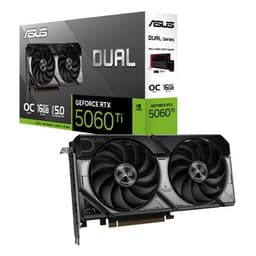
Frigate's examples list YOLOv9 tiny at 320 pixels at 8ms on an RTX 3050, 6ms on an RTX 3070 and 5ms on an RTX 5060 Ti, with the small model at 640 pixels taking 22ms on the 5060 Ti. In our specs database, the ASUS RTX 5060 Ti 16GB Dual OC is one example of that card. A graphics card typically draws much more power than an NPU or M.2 accelerator, though, so it makes most sense in a PC or server you already run around the clock. Note too that Home Assistant OS can't use NVIDIA GPUs for Frigate.
Best for AMD systems: Radeon graphics via ROCm
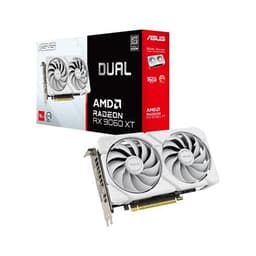
AMD users have two routes. Discrete Radeon cards work with the stable-rocm image, and Frigate's examples show YOLOv9 tiny at 320 pixels at about 4ms on an RX 9060 XT 16GB, such as the ASUS RX 9060 XT 16GB Dual White in our specs database. AMD's Radeon 780M integrated graphics is listed at about 14ms with the same model. Frigate describes ROCm as supporting a limited set of model architectures and running best on discrete AMD GPUs.
Ryzen AI processors with an XDNA 2 NPU can also run detection through a community-maintained add-on, but Frigate says it has only been tested with YOLOv9 and runs via a proxy that adds some latency. Home Assistant OS doesn't support AMD GPUs for Frigate.
Also worth knowing: Intel Arc, Apple Silicon and MemryX
Intel Arc graphics cards use the same OpenVINO detector as Intel integrated graphics, including B-series (Battlemage) cards such as the Intel Arc B580 Limited Edition. Frigate's examples list MobileNetV2 at about 5ms on an Arc A310 and about 4ms on an Arc A750.
Apple Silicon Macs from the M1 onwards can use their Neural Engine through a detector that runs on the Mac itself, outside Docker, and talks to Frigate over a local proxy. Frigate lists YOLOv9 small at 320 pixels at 10ms on an M4.
MemryX MX3 is a community-supported M.2 2280 module. Frigate's table, measured on an Intel Core i7-13700 host, lists YOLO-NAS small at 320 pixels at about 9ms, with about 378 frames per second of total throughput, and says multiple modules can be combined.
Only for very low power: Google Coral
The Coral EdgeTPU, in USB and M.2 or PCIe versions, is still supported, and Frigate calls it "one of the most power-efficient devices" for running object detection models. But the project now advises against it for new installations, except where power use must be particularly low or the hardware can't use another accelerator. Frigate also says it supports primarily SSDLite and MobileNet model architectures. If you already own one, keep using it; if you're buying today, one of the options above is a better investment.
Whatever you choose: decoding still needs your CPU or GPU
An AI detector only handles object detection. Frigate's hardware page is clear that the Coral, for example, does not help with decoding video streams, which can take a lot of CPU power with several high-resolution cameras. Using your Intel, AMD or NVIDIA graphics for hardware video decoding is just as important as picking a detector. A useful rule of thumb from Frigate is to divide 1,000 by your detector's inference time in milliseconds to estimate its maximum detections per second.
Our verdict
Start with what you have: Intel integrated graphics running OpenVINO is good enough for many homes, according to Frigate, and a low-power N100 mini PC is the project's own favourite server. If you're buying new, an Intel Core Ultra mini PC adds an NPU for more efficient detection. A Hailo-8 or Hailo-8L M.2 module is the best add-on accelerator for servers or a Raspberry Pi 5 without capable graphics, while an NVIDIA or AMD graphics card makes sense if it's already in an always-on machine and you want larger models. Skip the Google Coral for new builds unless very low power is your top priority.