Razer sells a lot of gaming headsets, and the BlackShark, Kraken and Barracuda names, plus Pro, X and HyperSpeed suffixes, don't make it easy to tell them apart. We've compared Razer's official UK specifications for seven models on its UK site, from a wired 240g esports headset to an active noise-cancelling wireless flagship, to help you choose.
Razer headsets compared
Headset | Connection | Battery (Razer rating) | Drivers | Weight | Mic | ANC |
|---|
BlackShark V3 Pro | 2.4GHz, Bluetooth, 3.5mm (plus USB wired on some versions) | Up to 70 hours (2.4GHz, PC) | 50mm TriForce Bio-Cellulose Gen-2 | 367g | Detachable HyperClear Full Band 12mm | Hybrid ANC |
BlackShark V3 | 2.4GHz, Bluetooth (plus USB wired on some versions) | Up to 70 hours (2.4GHz, PC) | 50mm TriForce Titanium Gen-2 | 270g | Detachable HyperClear Super Wideband 9.9mm | No |
BlackShark V3 X HyperSpeed | 2.4GHz, Bluetooth (plus USB wired on some versions) | Up to 70 hours (2.4GHz, PC) | 50mm TriForce Gen-2 | 270g | Detachable HyperClear Cardioid 9.9mm | No |
BlackShark V2 Pro | 2.4GHz HyperSpeed, Bluetooth 5.2 | Up to 70 hours | 50mm TriForce Titanium | 320g | Detachable super wideband | No |
BlackShark V2 X | Wired, 3.5mm | n/a | 50mm TriForce | 240g | HyperClear cardioid | No |
Kraken V4 | 2.4GHz (USB-C dongle), Bluetooth 5.3, USB wired | Up to 70 hours lighting off, 35 hours lighting on | 40mm TriForce Titanium | 350g | Retractable HyperClear Super Wideband | No |
Barracuda X | 2.4GHz (USB-C dongle), Bluetooth 5.2, 3.5mm | Up to 50 hours | 40mm TriForce | 250g | Detachable HyperClear cardioid | No |
All figures are from Razer's UK product pages. Battery figures are Razer's maximum ratings and vary by connection and platform; Razer rates the BlackShark V3 range at up to 48 hours over 2.4GHz on consoles and up to 35 hours with 2.4GHz and Bluetooth in use at once. If you're new to headset specs, our guide on how to choose a gaming headset explains what matters.
Best overall: Razer BlackShark V3 Pro
The BlackShark V3 Pro is Razer's most fully featured BlackShark and the only model here that Razer lists with active noise cancellation (hybrid ANC). It uses Razer's second-generation 50mm TriForce Bio-Cellulose drivers, rated at 12Hz-28kHz, and a detachable 12mm HyperClear Full Band mic with a rated 20Hz-20kHz frequency response, the widest mic range Razer lists for any model here. It connects over 2.4GHz wireless, Bluetooth or a 3.5mm cable, and Razer lists a USB wired mode for some versions too.
Razer sells separate versions for PlayStation and Xbox alongside the main model, so check the compatibility list before you buy: the Xbox version adds Xbox Series X|S and Xbox One support. Controls include an ANC button, SmartSwitch and either game/chat balance or mic sidetone, depending on the version. At 367g it's the heaviest headset here. Virtual surround is THX Spatial Audio, which Razer says needs Windows 11 version 23H2 or later.
Best lightweight wireless: Razer BlackShark V3 X HyperSpeed
If you don't need ANC, the BlackShark V3 X HyperSpeed brings the same rated 70-hour battery on PC and 2.4GHz plus Bluetooth connections at 270g, about 100g lighter than the V3 Pro. It uses 50mm TriForce Gen-2 drivers and a detachable 9.9mm HyperClear cardioid mic, and Razer lists 7.1 surround sound rather than THX Spatial Audio. Like the V3 Pro, it comes in PlayStation and Xbox versions.
The standard BlackShark V3 sits between the two. It has the same 270g weight and battery rating as the V3 X HyperSpeed, but upgrades to TriForce Titanium Gen-2 drivers, a Super Wideband mic and THX Spatial Audio, without the V3 Pro's ANC. Our Bluetooth vs 2.4GHz wireless guide explains which connection to use for games.
Best wired: Razer BlackShark V2 X
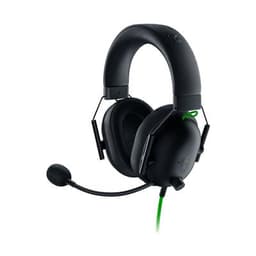
The BlackShark V2 X is the simplest and lightest option at 240g. It's a 3.5mm wired headset with a 1.3m cable, 50mm TriForce drivers and a HyperClear cardioid mic, and Razer lists compatibility with PC, Mac, PS4, Xbox One and mobile devices with a 3.5mm port. There's no battery to charge, and Razer offers it in black, green, white and quartz. Its 7.1 surround sound is only available on Windows 11 or later.
The older BlackShark V2 Pro is the wireless version of the same idea, with HyperSpeed 2.4GHz and Bluetooth 5.2, a rated 70-hour battery and THX Spatial Audio, at 320g. Our BlackShark V2 Pro vs BlackShark V2 X comparison covers the differences in detail.
Best for RGB: Razer Kraken V4
Of our main picks, the Kraken V4 is the only one with Razer Chroma RGB lighting. It has 40mm TriForce Titanium drivers, a retractable HyperClear Super Wideband mic and a volume dial, and it connects over 2.4GHz through a USB Type-C dongle, Bluetooth 5.3 (with AAC and SBC codecs) or a USB Type-A cable. Lighting affects battery life: Razer rates it at up to 70 hours with the lighting off and up to 35 hours with it on. Razer lists compatibility with PC, Mac, PlayStation, Nintendo Switch, Steam Deck and mobile devices. It's heavier than the BlackSharks at 350g.
The Barracuda X uses a USB Type-C 2.4GHz dongle, which suits devices with a USB-C port, and it also offers Bluetooth 5.2 and a 3.5mm cable. Razer lists compatibility with PC, PlayStation, Nintendo Switch 1 and Switch 2, and Android and iOS devices. It's light at 250g, with 40mm TriForce drivers, a detachable HyperClear cardioid mic, media controls and a rated battery life of up to 50 hours.
Also consider: Razer Kraken Kitty V2 BT
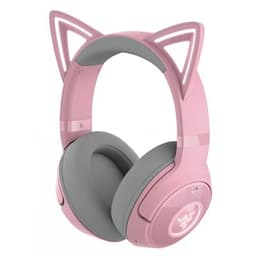
The Kraken Kitty V2 BT is the style pick: a Bluetooth 5.2 headset with cat ears and two Razer Chroma RGB zones. It has 40mm TriForce drivers, a rated battery life of up to 40 hours with USB Type-C charging, and omnidirectional mics built into the earcups rather than a boom mic. Razer also sells a wired USB Type-A version, the Kraken Kitty V2.
Before you buy
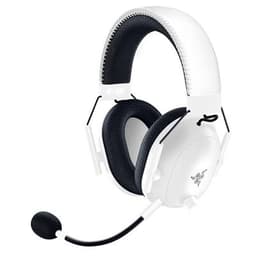
You can see full specifications for the Razer BlackShark V2 Pro Headset White, Razer BlackShark V2 X 7.1 Headset Black and Razer Kraken Kitty V2 BT Headset Quartz in our database. For other brands, see our best gaming headset, best wireless gaming headset and best SteelSeries Arctis Nova headset guides, and pair your headset with one of our best Razer gaming mouse picks.
Our verdict
The BlackShark V3 Pro is the best Razer headset if you want everything, with hybrid ANC, a Full Band mic and up to 70 hours of rated battery life on PC. The BlackShark V3 X HyperSpeed is the better pick for a light wireless headset without ANC, the BlackShark V2 X is the best wired option at 240g, the Kraken V4 suits RGB fans, and the Barracuda X is the most flexible for handhelds and Switch.