LG's UltraGear range covers almost every kind of gaming monitor, from a 24-inch 180Hz IPS screen for budget builds to a 1000Hz esports panel and a 45-inch 5K2K curved OLED. We've picked five current UltraGear models and compared them using LG UK's official specifications to help you choose the right one.
At a glance
Model | Size / resolution | Panel | Max refresh rate | Inputs |
|---|
27GX790B | 26.5in, 2560 x 1440 | OLED | 540Hz (720Hz at HD) | 2x HDMI, DisplayPort 2.1, USB-C |
32GS95UE | 31.5in, 3840 x 2160 | OLED | 240Hz (480Hz at FHD) | 2x HDMI, DisplayPort 1.4 (DSC) |
45GX950A | 44.5in, 5120 x 2160, 800R curve | OLED | 165Hz (330Hz at WFHD) | 2x HDMI, DisplayPort 2.1 (DSC), USB-C 90W |
25G590B | 24.5in, 1920 x 1080 | IPS | 1000Hz (1100Hz overclock) | 2x HDMI, DisplayPort 2.1 |
24GS65F | 23.8in, 1920 x 1080 | IPS | 180Hz | 1x HDMI, DisplayPort 1.4 |
All specifications are from LG UK's product pages.
Best overall: LG UltraGear 27GX790B
The LG UltraGear 27GX790B is the pick for most serious gamers who want an OLED. It's a 26.5-inch 2560 x 1440 panel that runs at up to 540Hz, with LG's Dual-Mode switching to 720Hz at HD resolution. LG says it uses its 4th Gen Primary RGB Tandem OLED technology and can reach up to 1,500 nits peak brightness, and it carries VESA DisplayHDR True Black 500 certification. Response time is listed at 0.02ms (GtG).
It has two HDMI ports, a DisplayPort 2.1 input, USB-C (used as the USB upstream port) and two USB 3.0 downstream ports. The stand adjusts for tilt, height, swivel and pivot. It supports G-SYNC Compatible and FreeSync Premium Pro. If you're weighing it against ASUS's 360Hz QD-OLED rival, see our LG 27GX790B vs ASUS XG27ACDNG comparison.
Best 4K OLED: LG UltraGear 32GS95UE
The 32GS95UE is the one to choose for a large, sharp OLED that still works for fast games. It's a 31.5-inch 3840 x 2160 OLED running at up to 240Hz, and its Dual-Mode switches to 1920 x 1080 at 480Hz. LG lists 0.03ms (GtG) response time, DisplayHDR True Black 400 and 98.5% DCI-P3 typical colour coverage. It also has two 10W speakers and LG's Pixel Sound feature.
Its DisplayPort input is version 1.4 with DSC, alongside two HDMI ports and a two-port USB 3.0 hub. This model isn't in our product database yet. For alternatives, see our best 4K gaming monitor guide.
Best ultrawide: LG UltraGear 45GX950A
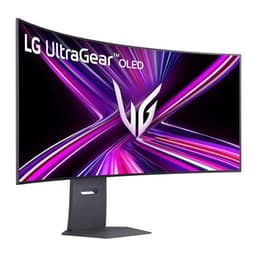
The LG UltraGear 45GX950A is LG's big statement monitor: a 44.5-inch 21:9 OLED with a 5120 x 2160 (5K2K) resolution and an 800R curve. It runs at up to 165Hz at full resolution, and LG's Dual-Mode switches to WFHD at 330Hz. LG lists DisplayHDR True Black 400 and 98.5% DCI-P3 typical coverage, plus an anti-glare finish.
It's also the best-connected model here: DisplayPort 2.1 with DSC, two HDMI ports and a USB-C port with 90W power delivery, plus two USB 3.0 ports and two 10W speakers. It's heavy at 14kg with the stand, so check your desk. See our best ultrawide gaming monitor guide for other options.
Best for esports: LG UltraGear 25G590B
The LG UltraGear 25G590B is built for competitive players chasing the highest possible refresh rate. LG calls it the world's first native 1000Hz FHD monitor, with a 24.5-inch 1920 x 1080 IPS panel and up to 1100Hz with overclocking. LG notes that G-SYNC compatibility is only certified at 1000Hz, and that reaching 1000Hz depends on your system and game. It lists DisplayHDR 400 and 400cd/m² typical brightness.
Inputs are two HDMI ports and DisplayPort 2.1, and the stand offers tilt, height and swivel. You'll need a very fast CPU and graphics card to get anywhere near 1000fps; we covered the launch in our LG UltraGear 25G590B news story, and our best esports monitor guide has other fast options.
Best budget: LG UltraGear 24GS65F
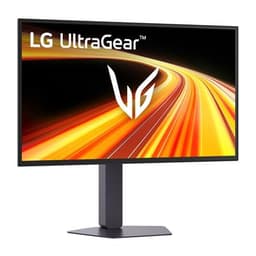
The LG UltraGear 24GS65F is the sensible choice for a budget or mid-range PC. It's a 23.8-inch 1920 x 1080 IPS monitor running at up to 180Hz, with 1ms (GtG at Faster) response time, 99% sRGB typical coverage and 300cd/m² typical brightness. It supports HDR10, G-SYNC Compatible and FreeSync.
Connections are simpler, with one HDMI 2.0 port and one DisplayPort 1.4 input, but the stand still adjusts for tilt, height (110mm) and pivot. Our best 1080p gaming monitor guide covers its rivals.
How to choose
Start with resolution and the frame rates your PC can actually reach. A mid-range graphics card is a better match for the 24GS65F's 180Hz than the 25G590B's 1000Hz. If you're buying an OLED, read our guide to preventing OLED burn-in and check the warranty terms with the retailer, as LG's product pages don't state them. Our how to choose a gaming monitor guide covers the basics, and our QD-OLED vs WOLED explainer covers LG's OLED technology against Samsung's.
Our verdict
The LG UltraGear 27GX790B is the best LG UltraGear monitor for most gamers, combining a 540Hz 1440p OLED panel, a 720Hz HD mode and DisplayPort 2.1. Pick the 32GS95UE for a 4K OLED with a 480Hz FHD mode, the 45GX950A for a huge 5K2K curved ultrawide with 90W USB-C, the 25G590B if you're a competitive player who can push extreme frame rates, or the 24GS65F for an affordable 180Hz 1080p screen.