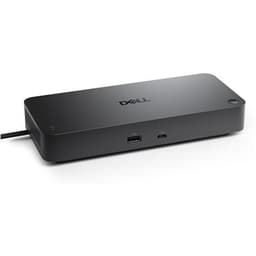
A Thunderbolt 5 dock turns one cable from your laptop or desktop into a full desk setup: monitors, fast storage, wired networking and charging. Thunderbolt 5 doubles Thunderbolt 4's bandwidth to 80Gbps in each direction, with a Bandwidth Boost mode of up to 120Gbps for displays. We've picked docks using the makers' published specifications.
Before you buy: what your PC needs
Kensington's FAQ for its SD5000T5 sums up the requirements well. To get the full capability you need an Intel-certified Thunderbolt 5 port, DisplayPort 2.1 support for the maximum resolutions, and USB-C PD 3.1 EPR support for 140W (28V/5A) charging. Kensington notes that some laptops claim PD 3.1 support but only charge at up to 100W.
On a Thunderbolt 4 or USB4 laptop, Kensington says its dock drops to 40Gbps with dual 4K 60Hz. Windows 10 doesn't support Thunderbolt 5 features, so you'll want Windows 11 version 23H2 or later. If you're unsure of the difference between the standards, see our USB4 vs Thunderbolt 5 explainer.
Best Thunderbolt 5 dock overall: CalDigit TS5 Plus
The TS5 Plus is the port-heavy choice. CalDigit's datasheet lists 20 ports: a Thunderbolt 5 host port (up to 120Gbps), two downstream Thunderbolt 5 ports (80Gbps), five 10Gbps USB-C and five 10Gbps USB-A ports, DisplayPort 2.1, SD 4.0 and microSD 4.0 (UHS-II) readers, 10 Gigabit Ethernet and three audio jacks.
Charging: up to 140W to the host, 36W from each downstream Thunderbolt 5 port and 36W from one front USB-C port.
Displays: triple 4K at 144Hz or dual 8K at 60Hz.
Extras: dual 10Gbps USB controllers, which CalDigit says only work on Thunderbolt hosts and USB4 hosts that support PCIe.
CalDigit says the TS5 Plus isn't compatible with Thunderbolt 3 Windows PCs, or with plain 5Gbps or 10Gbps USB-C hosts. The built-in 10GbE port is the standout if you have a fast NAS or network; see our 10GbE vs 2.5GbE comparison.
Best for most Windows laptops: Kensington SD5000T5 EQ
Kensington's SD5000T5 EQ is a smaller, 11-port dock. Kensington lists one Thunderbolt 5 host port with up to 140W charging, three Thunderbolt 5 downstream ports, three 10Gbps USB-A ports, 2.5GbE Ethernet, SD and microSD (UHS-II, SD 4.0) readers and a front 3.5mm combo audio jack.
Downstream power: one Thunderbolt 5 port supplies up to 60W, and the other two up to 15W.
Displays: triple 4K at 144Hz, dual 8K at 60Hz, single 8K at 60Hz or 1080p at 540Hz, through the Thunderbolt 5 ports.
Warranty: Kensington lists a limited three-year warranty.
It's driverless, and Kensington's DockWorks software is available for Windows. There's no dedicated HDMI or DisplayPort output, so monitors connect through the Thunderbolt 5 ports, or adapters.
Best for Mac and PC creators: OWC Thunderbolt 5 Dock
OWC's 11-port Thunderbolt 5 Dock (OWCTB5DOCK11P) is built around three Thunderbolt 5 ports for storage, displays and accessories. OWC says it supports up to three 8K displays, delivers up to 140W charging, and includes a 2.5GbE port and a 3.5mm audio jack, with a 1m Thunderbolt 5 cable in the box. OWC also says you can connect multiple daisy chains of drives, monitors and bus-powered devices, and disconnect one chain without interrupting the others.
Also consider: Dell Thunderbolt 5 Smart Dock
If you use a Dell laptop, the Dell Thunderbolt 5 Smart Dock is already in our specs database. We haven't sourced its specs for this guide, so check Dell's own product page and compatibility notes for your laptop before buying.
Which should you buy?
Most ports and 10GbE: CalDigit TS5 Plus.
Compact dock with a 60W accessory port: Kensington SD5000T5 EQ.
Three Thunderbolt 5 ports for drive and display chains: OWC Thunderbolt 5 Dock.
If your laptop only has USB-C with no Thunderbolt or USB4, a Thunderbolt 5 dock is the wrong buy. If you have USB-C problems after connecting a dock, our USB-C troubleshooting guide explains what Windows 11's warnings mean.
Our verdict
The CalDigit TS5 Plus is the most capable Thunderbolt 5 dock here on CalDigit's specs, with 20 ports, 140W host charging and 10GbE. The Kensington SD5000T5 EQ is the simpler pick for a Windows Thunderbolt 5 laptop, and the OWC dock suits anyone chaining fast external drives. Whichever you choose, check that your laptop has a certified Thunderbolt 5 port and supports 140W PD 3.1 charging, or you won't get the full benefit.